


Changelog

Updated to v27.0.0.0
 new: The "One Level Up" checkbox in the Environment window and Quick Settings panel.
VTM places the output files in the parent folder, not beside the video files. The default value is OFF.
new: The "One Level Up Folder" section in the Environment window and Quick Settings panel.
You can define a Custom folder to store files for the "One Level Up" feature. The default value is OFF.

new: The "Mb/s" checkbox in "Options" -> "Technical details". VTM stamps the bitrate in Mb/s when ON and in kb/s when OFF. The default value is ON.

Please compare the difference in output below:

new: The "Swap Tile Width and Height for Vertical Videos" checkbox in "Options" -> "Non-16:9 Adjustments" window. When Tile Width is set to 400, you'll get 224x400 instead of 400x224 for Vertical Videos. The default value is ON.

changed: The "Adaptive SM" option has been renamed to "Adjust Simple Matrix to fit your Screen's Aspect Ratio" and moved to the new "Non-16:9 Adjustments" section of the "Options" window.

changed: The "Force 16:9" option now overrides your custom Tile Height.
changed: Improved appearance of the "File Size" caption line.
changed: The text limitations for Processing Time and Estimation Time have been increased from 24 hours to 10 days.
changed: Several cosmetic changes, along with many translation updates.
changed: The Audio/Video information module has been updated.
fixed: 10-bit SDR videos treated as 10-bit HDR.
fixed: 180-degree rotated videos were not rotated correctly on all engines for certain video formats.
fixed: Incorrect output path for UNC resources when "Preserve Folder Structure" was ON.
fixed: Rare bug where folders were not listed in alphabetical order in the Folder Browser.
new: Support of the latest VTM 27.0.0.0+ screenlists.
fixed: Various minor fixes.
special note: If you use Pictures Thumbnails Maker (PTM), you may want to install its latest version as well, because PTM uses its own instance of the Viewer. Windows launches the Viewer from the location where the latest PTM or VTM launch occurred.
Updated to v26.0.0.2
changed: Video bitrate detection has been enhanced for MKV files.
changed: Audio/Video information module has been updated.
Updated to v26.0.0.1
new: The selected output file types are highlighted below the corresponding button in the Environment window.

Updated to v26.0.0.0
new: The "Create a new folder for each run" checkbox in the Environment window and in the Quick Settings panel. It creates a VTM_Run_00000N folder for each run (click on the Start button) when enabled. The number in the name of the folder is increased every time you run the processing. If the folder exists, VTM will increase the number. The default value is OFF.

new: The Environment window was redesigned.
new: The "Output File Types" button in the Environment window with relevant settings inside.

new: The "Write Logs" checkbox in the Environment -> "Output File Types" window. The default value is ON.

new: VTM lists all available video cards in the startup log.
changed: Audio/Video information module is updated.
new: A S D W hotkeys as an alternative for those who can't use Mouse Scroll or PageUp / PageDown keys.
new: Support of the latest VTM 26.0.0.0+ screenlists.
special note: If you use Pictures Thumbnails Maker (PTM), you may want to install its latest version too, because PTM uses its own instance of the Viewer. Windows launches the Viewer from the location from which the latest PTM or VTM launch happened.
Updated to v25.2.0.0
new: Base Presets preview style in the Options window.
new: The "Zoom-in small imported pictures to fit the Tile frame (CSM 1-2)". Default: OFF.

changed: The "Fit Screen AR" has been renamed to the "Adaptive SM".

changed: The "Adaptive SM" is OFF by default to avoid confusion.
fixed: HDR 10-bit support for low resolution video files.
new: The "Move deleted files to Recycle Bin" setting in the "Preferences" window. Default: ON.

new: Support of the latest VTM 25.2.0.0+ screenlists.
special note: If you use Pictures Thumbnails Maker (PTM), you may want to install its latest version too, because PTM uses its own instance of the Viewer. Windows launches the Viewer from the location from which the latest PTM or VTM launch happened.
Updated to v25.1.0.0
new: The "Fit Screen AR" checkbox in the "Options" window. It automatically adjusts the Simple Matrix for your Screen Aspect Ratio. It is a newer version of the recently added feature. The new one is better, and it works for non-vertical videos. The algorithm is based on the total desired count of Tiles. Default: ON.

new: The Preview feature has been enhanced. New colors and resolutions are used, the Tile number is in the center.
new: Vertical Preview button in the "Options" window.

changed: The installer checks the date of Base Presets not to overwrite the modified ones.
fixed: Numerous bugs in the The Hardcode Times window.
Updated to v25.0.0.0
new: The "Automatically adjust Simple Matrix for Vertical Videos" checkbox in the "Options" -> "Miscellaneous" window. VTM will construct the closest matrix to fill the screen. Default: ON.

Please compare with the old result:

new: You can create animation files without any additional picture output.
new: GIF animation creation speed has been increased significantly for certain scenarios.
new: H264/H265 animation creation speed has been increased by 30% when using "Magic" processing.
new: Nvidia RTX 40+ users: 30% speedup for creating AV1 animations when using "Magic" processing.
new: The "CPU Load" control for "Magic" processing in the main window. 5 possible values: MIN, 1/4, 1/2, 3/4 and MAX. You can change the value on the fly. Default: MAX.

new: The "Separate thousands by spaces (2 324 MB vs 2324 MB)" checkbox in the "Options" -> "Miscellaneous" window. Default: ON.

new: The "Display confirmation dialog when closing the Choose Shots Manually window" checkbox in the "Settings" -> "Appearance & Confirmations" window. Default: ON.

changed: Audio/Video information module is updated.
fixed: AV1 and WebM animations were failing randomly when using "Magic" processing.
fixed: Animations with audio were failing with 60+ animation sections.
fixed: Wrong frame rate for certain video files (which also could be a reason for failed animations).
fixed: Rare "-02:-48:-05" issue in the Codec-Independent "Choose shots manually" interface.
fixed: Windows scaling factor does not influence the resolution of the resulting thumbnail sheet anymore.
fixed: Ultimate engine: support of 4:2:2 video chroma subsampling.
fixed: Ultimate engine: support of AV1 10-bit video with Colorspace SMPTE 170M.
new: You can select VTX-animation file types separately to display in addition to the "Browse only VTX files and VTM animations" feature in the "Preferences" window. They are: WebP, WebM, MP4, MKV, GIF, OGV.

new: WebP file extension has beend added to the "Choose from disk" PTX-feature file browser.
new: Support of VTM 25.0.0.0+ screenlists.
new: Support of PTM 6.0.0.0+ thumbnail sheets.
changed: Windows scaling factor does not influence the resolution of displaying pictures anymore.
special note: If you use Pictures Thumbnails Maker (PTM), you may want to install its latest version too, because PTM uses its own instance of the Viewer. Windows launches the Viewer from the location from which the latest PTM or VTM launch happened.
Updated to v24.0.0.0
new: Hardware acceleration for H.265 (HEVC) in the Codec-Independent "Choose Shots Manually" interface.
new: The "HDR10" label in the Video Details for 10-bit HDR videos.

changed: Audio/Video information module is updated.
fixed: Keyframe navigation for H.265 (HEVC) in the Codec-Independent "Choose Shots Manually" interface.
fixed: The "Edit Screenlist" feature in Videonizer did not work correctly in some cases.
fixed: AV1 HDR 10-bit support.
new: The "Move Video" feature in the main context menu (hotkey: Ctrl+M).
new: The "Move Both - Video and Picture" feature in the main context menu (hotkey: Ctrl+Shift+M).
Updated to v23.0.0.0
new: HDR 10-bit Support.

fixed: Corrupted video frames in the Codec-Independent "Choose Shots Manually" interface for certain video file types.
Updated to v22.0.0.1
changed: Few cosmetic changes.
new: Hardware accelerated playback of Animations.
new: The "Show the File Counter Panel (it displays the Current position / Total count of files in the folder)" in the "Preferences".
new: The "Hide File Info Panel completely (when leaving the most right and middle area of the window)" in the "Preferences".
fixed: Different Animation playback drawbacks.
Updated to v22.0.0.0
new: Ultimate and Crystal engines: support of AV1 format has been added.
new: You can create animations in AV1 format (64-bit VTM only) with MP4 and MKV containers. Please refer to the table below for more details (click to view in full size):

You can find new animation formats in the "Settings" -> "Animation Settings" window, or in the "Options" -> "Animation" window:

new: The "Prevent collisions" checkbox in the "Settings" -> "Naming scheme" section. It is not recommended to turn it OFF, but still could be useful in some scenarios. The default value is ON.

new: The "Use modern Windows Folder Browser as a Classic Folder Browser" in the "Settings" -> "Appearance & Confirmations" window. You can still use the old one by turning the setting OFF. The default value is ON.

changed: Few cosmetic changes.
new: Support of VTM 22.0.0.0+ screenlists.
new: Playback of VTM-animations in AV1 format (both MP4 and MKV).
new: The "Use modern Windows Folder Browser as a Classic Folder Browser" in the "Preferences" (CTRL+P hotkey).
Updated to v21.1.0.0
new: Up to 40% faster WebM animation creation speed when the Multi-Threading is ON in the VTM Animation Settings.

changed: Few cosmetic changes.
fixed: Ultimate Engine could crash the app when processing certain file types.
Updated to v21.0.0.0
new: VTM prevents filename collisions automatically when the "Output folder" is set. VTM adds extra "_(COPY_0001)", "_(COPY_0002)", etc. suffixes when files with the same name are coming from different folders.
new: Spanish translation added.

changed: VTM uses 4-digit system (0000) instead of 3-digit system (000) for file names when needed.
changed: Audio/Video information module is updated.
changed: Few cosmetic changes.
fixed: Numerous issues related to the "Skip" feature for different combinations of Settings and Options.
fixed: Wrong file and folder names in the output for certain combinations of Settings and Options.
new: The mouse "Back" button navigates you 1 level back or closes the Viewer.
new: You can use the "T" hotkey to delete the corresponding Video file.
new: You can use the "L" hotkey to delete both the Video and the Screenlist.
Updated to v20.0.0.0
new: Bigger windows, controls and fonts for the rest of the app.

new: The "Show Timestamp in frame" checkbox in the "Options" -> "Animation" window. It allows you to show / hide the Timestamp in the animation frame (when the Timestamp is enabled in Options). The default value in ON.

new: The "Dynamic Timestamp in frame" checkbox in the "Options" -> "Animation" window. It allows you to make the Timestamp ticking in the animation frame (when the Timestamp is enabled in Options). The default value in ON.

new: The "Folder" checkbox in the "Options" -> "Technical details". It allows you to display the parent folder name on the screenlist beside the filename. The default value is OFF.

new: The [PARENT FOLDER] tag in the Comment window. Use it to print the parent folder name in the comment section of the screenlist.
changed: Audio/Video module updated.
fixed: Magic: Unexpected crash under certain rare circumstances.
fixed: Magic: Blinking "Please wait" window when the "Delete orphan Screenlists..." setting is on.
fixed: The "Number of Sections" animation option was loaded incorrectly from the VTM Options file.
fixed: The video rotation flag was not taken into account since VTM 19.0.0.0.
fixed: Choose shots manually interfaces 1 and 2 did not take into account video rotation flags.
fixed: User's tile width was ignored when the video rotation was present.
fixed: Missing "Add custom suffix to filenames" text field in the Environment window.
fixed: Corrupted fonts when Clear Type is off in Windows.
new: Support for VTM 20.0.0.0+ screenlists.
special note: If you use Pictures Thumbnails Maker (PTM), you may want to install its latest version too, because PTM uses its own instance of the Viewer. Windows launches the Viewer from the location from which the latest PTM or VTM launch happened.
Updated to v19.0.0.0
new: Unleash the power of your multi-core CPU with the new Magic Screenlist Generation feature.
It is 4-6 times faster than a single task implementation (depends on your CPU and on the task). Unbelievable? Give it a try.

new: You can find the Magic button next to the regular Start button.

new: The Magic Screenlist Generation feature spawns one task per CPU thread. The only exception is when you create an H264/H265 animation - maximum 3 simultaneous tasks in that case. The rest of the functionality is the same.

new: The Magic progress bar on the top of the window displays overall progress. The first number is the number of completed tasks (blue on the bar). The second number is the number of spawned tasks (smoke grey on the bar). The third number (of) is the total number of tasks.

new: The regular per-task progress bars display the currently used engine and the progress itself.

new: When it comes to animations, a different bar is displayed. It contains the type of animation (single framed or not), number of sections x section length, multithreading mode, audio mode, animation format and quality icons. The animation progress bar is displayed on the right in that case (in magenta color).

new: Faster loading of the application.
new: Fresh feel and look of the application. Main windows and fonts have become bigger, the layout has been redesigned a bit.
new: You can open *.VTS files in VTM (double click in your file manager to open a VTS file in VTM).
new: The "Naming scheme" section in the Settings window. The "Based on the Folder name" means to use Parent folder name + raw number addon (like MyFolder_0001.vtx). The "Folder name + File name" means to use Parent folder name + Filename (like MyFolder_MyFilename.mp4.vtx).

new: You can still set the "Naming scheme" individually (override it) by using the right mouse button context menu in the main window.

new: The "Display confirmation dialog when deleting items" checkbox was added to the Settings -> Appearance & Confirmations window.

changed: Removed unnecessary confirmation windows from Choose Shots Manually interfaces.
changed: Audio/Video information module is updated.
changed: Few cosmetic changes.
fixed: Wrong number of animation sections in VTM exported Options files.
fixed: The currently selected item was deleted from the main list instead of the one you had clicked with the delete icon.
fixed: Window height for the Choose Shots Manually interfaces.
new: Support for VTM 19.0.0.0+ screenlists.
special note: If you use Pictures Thumbnails Maker (PTM), you may want to install its latest version too, because PTM uses its own instance of the Viewer. Windows launches the Viewer from the location from which the latest PTM or VTM launch happened.
Updated to v18.0.0.0
new: Started from this version, screenlists generated in VTM can be edited in Videonizer 13.0.0.0+.
new: The "Double-sized Tiles in Choose Shots Manually interfaces" in the "Settings" -> "Appearance". The default value is ON.


fixed: Multiple Aspect Ratio issues related to the Choose Shots Manually interfaces.
fixed: Several minor rare bugs.
fixed: Chinese translation was corrected.
new: Support for VTM 18.0.0.0+ screenlists.
changed: The "Locate Video" hotkey has been changed from F5 to F3.
fixed: Screenlists did not open when VTM executable was not present beside the PTV executable.
special note: If you use Pictures Thumbnails Maker (PTM), you may want to install its latest version too, because PTM uses its own instance of the Viewer. Windows launches the Viewer from the location from which the latest PTM or VTM launch happened.
Updated to v17.3.0.0
new: Chinese traduction added.

new: New Language selector.

new: The "Video Extensions" button in the first start window.

new: The flags of Canada, Austria and Switzerland were added to DE and FR languages.

changed: *.TS and *.TS2 video extensions are enabled by default.
fixed: Engines 1 and 2 did not work properly in the 64-bit version of VTM.
Updated to v17.2.0.2
new: The installator asks for permission to overwrite your Custom Base Presets when detected.
fixed: VTM Options file could not be imported back to VTM after using it in Videonizer v12.2.0.1+.
special note: If you use Videonizer, please install its latest version too.
Updated to v17.2.0.1
changed: The way of connecting to the site has been updated to a more stable version.
Updated to v17.2.0.0
new: The "Create the Main Screenlist" checkbox in the "Advanced Timeline Control" (Options).
Since the Multi-Files feature could try to create extremely high main screenlists (which could be impossible due to memory limitations), a new option was added to turn ON/OFF the creation of the Main Screenlist.

changed: Better "Preview" results for the "Specific timestep" in the "Options".
fixed: The "Multi-Files for the "Specific timestep" feature produced visual glitches in many cases.
fixed: The "Skip video file..." feature did not skip files correctly when the "Multi-Files" feature was enabled along with the "Animation".
Updated to v17.1.0.1
fixed: Possible crash after the Drag&Drop operation under certain circumstances.
Updated to v17.1.0.0
new: The "Hardcoded Times" button was added to the both "Choose shots manually" interfaces. You can Load the "Hardcoded Times" (if present) from the current Options set and tune them finely. You can Save all the timestamps to the current Options set and use them later for other files.

fixed: The "Shift + Left Mouse Button" combination did not work in the "(Codec-dependent) Choose shots manually" interface when you clicked on a Tile.
Updated to v17.0.0.0
new: The "Hardcode Times" in Options. Rarely used but still nice to have. You can select (hardcode) Timestamps for your Matrix in a "Choose shots manually" style (all features are present). Later on thumbnails will be taken at the selected points for each file processed with the use of this Options set. The "Choose Shots Manually" interface overrides the "Hardcode Times".

new: The "Save files with the original Date/Time" in the Environment Settings. When the checkbox is ON, output files are saved with the same Date/Time as the original (source) file.

changed: One more way was added to extract Audio bitrate from MKV metadata.
changed: Description of the animation section feature in the "Choose shots manually" interfaces.
changed: Audio/Video module updated.
changed: Few cosmetic changes.
fixed: Possible crash due to the "Out of memory" exception under certain circumstances.
fixed: Fix to the previous version (The "MultiFiles for "Specific timestep" checkbox in the "Quick Settings" section did not work properly).
fixed: Fix to the previous version (Possible infinite loop when the "Try Substituting for any color frames" option was ON under certain circumstances).
fixed: Fix to the previous version (Black frames in the "(Codec-Independent) Choose shots manually" interface for HEVC-encoded videos).
Updated to v16.2.0.0
changed: One more case added to extract Audio bitrate from MKV metadata correctly.
fixed: Ultimate engine failed to process HEVC-encoded videos under certain circumstances.
fixed: Crystal engine did not rotate thumbnails for 180 degrees rotated videos.
fixed: Squished thumbnails for 90 degrees rotated videos.
fixed: Animations were created upside down for 180-degrees rotated videos.
fixed: Several last tiles could be omitted when the "Try Substituting for any color frames" option was ON under certain circumstances.
fixed: Frames were not rotated in the "(Codec-Independent) Choose shots manually" interface for 90 degrees rotated videos.
Updated to v16.1.0.2
fixed: Animations were not created under certain rare circumstances.
Updated to v16.1.0.1
fixed: Some WMV files had wrong timestamps (-02:-48:-05) on thumbnails.
fixed: Some WMV files did not work correctly in the codec-independent "Choose shots manually".
Updated to v16.1.0.0
changed: Audio/Video module updated.
changed: VTM settings are stored in the "Settings" branch of the Windows registry instead of the "Environment". If you use Videonizer, please update it to version 11.4.0.0+ to handle this change.
fixed: Wrong audio bitrate for MKV files.
fixed: Ultimate engine could crash under certain circumstances.
new: Support for RAR archives added (when 7-Zip is installed on your system, detected automatically). You can navigate through pictures in RAR archives using PTX files, but you still can't delete/rename files in RAR archives like you do for ZIP/7Z archives (RAR license restriction).
special note: If you use Pictures Thumbnails Maker (PTM), you may want to install its latest version too, because PTM uses its own instance of the Viewer. Windows launches the Viewer from the location from which the latest PTM or VTM launch happened.
Updated to v16.0.0.0
new: WebP animation creation speed has become 3x times faster than before. Please make sure the "Multi-Threading" checkbox is ON in the VTM animation Settings.

changed: The program stores all working files outside of the installation directory. These are log files and 4 folders: Logs, Options, Settings and Internet.
changed: The default installation paths for the 64 and 32-bit versions have become "C:\Program Files" and "C:\Program Files (x86)" respectively.
changed: Few cosmetic changes.
fixed: Sometimes Windows Mapped Network Drives were not listed in the Folder Browser.
fixed: Redundant vertical scrollbar in Codec-Independent Choose Shots Manually interface.
fixed: Few English grammar and spelling corrections.
fixed: Sometimes Windows Mapped Network Drives were not listed in the Folder Browser.
special note: If you use Pictures Thumbnails Maker (PTM), you may want to install its latest version too, because PTM uses its own instance of the Viewer. Windows launches the Viewer from the location from which the latest PTM or VTM launch happened.
Updated to v15.3.0.0
new: The "Delete broken Screenlists in the Output Folder" setting has been added under the "Save thumbnails to your Folder" setting. When enabled, VTM checks for broken Screenlists in the Output folder on the start of the job. The list of files to check is based on the current VTM settings:
- if VTX is enabled, then *.vtx are checked;
- if Classic is enabled, then *.jpg, *.jpeg, *.bmp, *.png, *.tiff are checked;
- if Animation is enabled then *.mp4, *.webm, *.webp, *.ogv are checked.

new: The "Delete broken Screenlists in the Output Folder" setting has been added to the "Quick Settings" on the main window. The default value is OFF.
new: The "Show Remote Paths for Network Drives in the Folder Browser" setting has been added to the "Environment" -> "Appearance" window. The default value is ON.

changed: The height of the main window has been increased.
changed: Few cosmetic changes.
fixed: Slow startup time when network drives are not available.
new: VTX feature support for PotPlayer (32 and 64-bit) has been added.
new: It is possible to zoom with the number-row's +/- keys in addition to the number-pad's +/- keys.
new: The "ESCAPE key minimizes the window" option has been added to the Preferences (CTRL+P) under the "Viewer behavior" section.

new: The "Show Remote Paths for Network Drives in the Folder Browser" setting has been added to the Preferences (CTRL+P). The default value is ON.

fixed: Slow startup when network drives are not available.
special note: If you use Pictures Thumbnails Maker (PTM), you may want to install its latest version too, because PTM uses its own instance of the Viewer. Windows launches the Viewer from the location from which the latest PTM or VTM launch happened.
Updated to v15.2.0.1
changed: Simple Matrix dimensions have been increased from 50x50 to 70x70.
fixed: Paths starting with two backslashes (\\something) were treated incorrectly.
fixed: Redundant scrollbars in Choose Shots Manually interfaces.
fixed: Possible Ultimate engine crash under certain circumstances.
Updated to v15.2.0.0
special note: Microsoft .NET Framework 4.8+ is required to run the application.
new: Ultimate and Crystal engines have become 10% faster.
new: Environment -> Appearance: The "Horizontal scrolling for long paths in the Main Window".

It allows you to rearrange the columns in the main window and get the horizontal scrolling for paths:
new: The main context menu: "Open Result containing Folder" menu item.

new: Use "Home" and "End" hotkeys in the Main window to jump to the very beginning and to the very end of the list. "Shift+Home" and "Shft+End" do the same but with the selection.
changed: Faster addition of files to the program, faster selection and deletion of items.
changed: Environment: The "Appearance" button is introduced. The "Restore last window position after restart" was moved there.

changed: Environment: The maximum Timeout value for screenlists has been increased to 60 mins. For animations - to 120 mins.
fixed: Jerky OGV (Theora) animations for the 64-bit version of the application.
fixed: Redundant scrollbars in Choose Shots Manually interfaces.
fixed: WebVTT didn't take into account the "Save each job into its own Folder" setting.
Nvidia card users: The minimum required Nvidia driver version for H.264 / H.265 animations is 456.71 or newer.
AMD card users: The minimum required Adrenalin driver version for H.264 / H.265 animations is 20.2.1 or newer.
Updated to v15.1.0.0
new: External Engines (1 and 2) have become much more stable.
new: The Resolution string for Anamorphic videos prints as follows: 1440x1080 @ 1920x1080.

changed: Update window has been changed.

changed: Currently used Engine is printed to the Log file.
fixed: Wrong aspect ratio for Anamorphic videos when using External Engines (1 and 2).
fixed: Console version of the previous release did not work for External Engines (1 and 2).
fixed: Context menus did not popup in Choose Shots Manually interfaces.
fixed: Anamorphic videos were displayed in the wrong aspect ratio in Choose Shots Manually interfaces.
fixed: Rare random freezes of the application.
Updated to v15.0.0.0
new: 32 and 64-bit versions of VTM are available. The 64-bit version has no 32-bit memory limitations. The 64-bit version is shipped with internal (embedded) codecs as well as the 32-bit version. 64-bit version is the option of choice for the rest of cases. Please note: when you use Engines 1 and 2, they use your external codecs, so you need 32-bit codecs to be installed in your system for 32-bit versions of VTM and 64-bit codecs to be installed for 64-bit versions of VTM.

new: Ultimate engine: Hardware acceleration is added to the Codec-Independent "Choose shots Manually" interface.
new: Ultimate engine: Improved hardware acceleration could also be noticed when processing, for instance, a 15x15 matrix for a 20 minutes length video (when the frames in-between key-frames are needed). The new version is 2x faster in such cases.
new: Environment Settings: Timeouts. You can set the time limit to create a single screenlist within (15 sec - 20 min) range. You can set the time limit to create a single animation (30 sec - 40 min). When the timeout is reached, VTM skips to the next item in the main list.

new: The "Timer" label is added to the top right part of the main window. It shows the current time progress and the Estimated Time of Completion after completion of the first item in the list.

new: Options: "Extend Matrix" checkbox in added to "Advanced Timeline Control" window. Enable it to let VTM add additional rows to your matrix when the "Specific Timestep" exceeds the matrix.

new: Tooltip hints for the main window items are working during the video processing. Hover the first column to get details (the current state, time spent for the main output, time spent for the animation).

new: Choose shots manually: Drag & Drop is working for snapping frames as well as for swapping already taken shots.

new: Environment Settings: *.RAM checkbox is added to the "Video Extensions".

new: Video card name is written to the Diag.log file at startup.
changed: "MultiFiles" checkbox now depends on the new "Extend Matrix" option. Disable the "MultiFiles" checkbox to get the main screenlist only. Enable it to get "MultiFiles" also.
changed: Tech details: FPS is always printed with 2 fractional digits.
changed: Tech details: Video bitrate measure unit is "kb/s".
changed: Tech details: Audio bitrate measure unit is "kbps".

changed: Few cosmetic changes.
fixed: VTM freezes when creating animations with invalid parameters (too narrow, too large, etc.).
fixed: Some animations could freeze the application after cancellation at the very beginning.
fixed: VTM failed to create long WebM animations with audio under certain circumstances.
fixed: GIF animations did not respect 100% / 50% / 33% framerate settings.
fixed: Command line interface did not support relative paths to video files correctly.
fixed: Wrong processing order after sorting of items in the main window list.
new: 32 and 64-bit versions of the Viewer are introduced. The 32-bit version is shipped with 32-bit versions of VTM. The 64-bit version is shipped with 64-bit versions of VTM.

new: Support for the new Pictures Thumbnails Maker features is added.
fixed: The initial picture size was wrong when the first item to view at startup was the animation.
special note: If you use Pictures Thumbnails Maker (PTM), you may want to install its latest version too, because PTM uses its own instance of the Viewer. Windows launches the Viewer from the location from which the latest PTM or VTM launch happened.
Updated to v14.2.0.0
please note: Microsoft .NET Framework 4.5+ is required to run the program.
new: Support for animations in MP4 format (H.264 and H.265) for AMD Radeon Series is added.
new: "Force 16:9" checkbox is added to Options window. When ON, VTM adds black bars to the top/bottom or left/right side of frames to keep 16:9 aspect ratio.

new: "Use it for 16:9" checkbox is added next to Background color in Options window. By default, VTM uses Black bars for "Force 16:9". Set this checkbox ON to use background color for bars.

new: The total count of Audio tracks and theirs languages are printed to Audio details string.
new: [LANGS] tag is added to comment line. Use it to print audio languages info.
new: "Subtitles" checkbox is added to Options window. When ON, a new line is printed to Technical details with the total count of Subtitles and theirs languages.

new: [SUBS] tag is added to comment line. Use it to print subtitle details.
changed: [AUDIO] tag is comment line now prints audio details without track languages.
changed: Video/Audio tech strings are rearranged a bit. Double colon is introduced as a new separator. Here is an example of such output:

changed: Tech details are printed transparent when your custom picture is used as a background.
changed: Cut edges are filled with the current background color instead of white when "Draw a White Border" effect is enabled.
fixed: VTM failed to create short animations with sound under certain circumstances.
changed: Shift+Del hotkey is changed to Ctrl+Shift+Del for safety.
fixed: Navigation arrow keys were not working in Full Screen mode without Taskbar.
special note: If you use Pictures Thumbnails Maker (PTM), you may want to install its latest version too, because PTM uses its own instance of the Viewer. Windows launches the Viewer from the location from which the latest PTM or VTM launch happened.
Updated to v14.1.0.0
new: Embedded codecs are updated to support the latest video formats.
new: "Auto with Advanced Timeline Control" button is added to codec-independent "Choose shots manually" interface.
new: [VIDEO] tag for comment line to print Video details.
changed: Maximum tile size is increased.
changed: [CREATED] tag is back to comment line in addition to previously introduced [CR] tag.
changed: Default size unit for comment line is changed from bytes to megabytes.
changed: More diagnostic information is printed to Diag.log file.
fixed: Audio was unsynced or not created for long animations under certain circumstances.
fixed: VTM failed to create thumbnail sheets under certain circumstances.
new: You can switch between Full Screen and Windowed modes in Preferences (hotkey: F11).
new: New "Show Windows Taskbar in Full Screen mode" checkbox is added to Preferences window.

new: VTX feature support for SMPlayer (9.5+) is added.
special note: If you use Pictures Thumbnails Maker (PTM), you may want to install its latest version too, because PTM uses its own instance of the Viewer. Windows launches the Viewer from the location from which the latest PTM or VTM launch happened.
Updated to v14.0.0.0
new: 3 new animation formats are added: MP4 (H.264 (AVC), H.265 (HEVC)) and OGV (Theora). Please refer to the table below for details (click to view full size image):

You can select animation format in Animation Options and Settings:

new: You can create H.264/H.265/OGV animations using VTM right from Videonizer 6 or higher.
new: You can use "Choose shots manually" interface to select which frames are to be used as a starting point for animation sections. So you can create any animation you want. You can use right mouse button on already selected frame to set the duration of the section. Sections are animated in order of appearance in "Choose shots manually". To discard the section from the animation just select "Not animate" in Tile context menu.

new: You can also set the default duration for all further frames snapped in "Choose shots manually" interface using special new button right below the "Snap" button.

new: 6 new tags are added to Options for the Comment.
They are: [NAME] (Filename), [SIZE] (Filesize), [DUR] (Duration), [WxH] (Resolution), [FPS] (Framerate), [AUDIO] (the number of audio streams and channels).

new: *.OGV checkbox is added to Settings -> "Add files with the following extensions".

changed: The design of "Animation Quality" indicator has changed.

changed: "MultiFiles for Specific timestep" checkbox was added to "Quick Settings" panel on the main window.

changed: VTM asks for "Output folder" when selected one does not exist.
changed: Video files (animations) produced by VTM can not be added to VTM anymore (there is no sense in doing that).
changed: "_VTM" suffix is added to all animations (except of WebP) created by VTM.
changed: "Change" link is added to "Comment" in Option. It allow to modify your custom comment in a wider textbox.

fixed: Animation creation freezed for source video files without any audio stream.
fixed: FPS was not showed for certain video files.
new: Playback of VTM-MP4 (H.264 and H.265) and VTM-OGV animations is added.
fixed: "Out of memory" issue for long animations is fixed.
fixed: Double click on a Tile worked incorrectly on some environments.
fixed: Ampersand symbol (&) in paths was interpreted incorrectly.
special note: If you use Pictures Thumbnails Maker (PTM), you may want to install its latest version too, because PTM uses its own instance of the Viewer. Windows launches the Viewer from the location from which the latest PTM or VTM launch happened.
Updated to v13.0.0.1
new: Animated thumbnail sheets are enables for all cases of Choose shots manually.
new: The Viewer searches for original pictures beside the PTX-file when absolute links are broken for some reason. The Viewer does not change the PTX file itself. If you want to change the broken link permanently (it has sense for Tile substitution), please check the feature below.
new: "Permanently substitute missing absolute paths for PTX Tiles to existing relative ones" option is added to Preferences (Ctrl+P). The option changes PTX-files permanently. "Tile Substitution" and "Auto-Substitution after Deletion" features will use PTX-file folder for affected Tiles.
special note: If you use Pictures Thumbnails Maker (PTM), you may want to install its latest version too, because PTM uses its own instance of the Viewer. Windows launches the Viewer from the location from which the latest PTM or VTM launch happened.
Updated to v13.0.0.0
new: WebP animation creation speed is 2x times faster than before.
WebP is natively supported by all most popular browsers. Firefox and Edge joined the club in late 2018 / early 2019. Please consider the following picture when choosing between WebM and WebP:

new: You can define a custom suffix for output files in Environment window. The suffix is added to the end of each file name, just before the final extension.

changed: This one is related to Animation parameters form opened in Options window. Click on the top right button shows the comparison table between WebM and WebP types of animation.
new: WebP animation playback is improved.
new: Support for new Pictures Thumbnails Maker "MultiFiles" feature is added.
new: VTX feature support for KMPlayer 64-bit is added.
special note: If you use Pictures Thumbnails Maker, you may want to install its latest version too, because PTM uses its own instance of Pictures Thumbnails Viewer.
Updated to v12.1.0.2
new: The Folder browser has been improved. The Address bar, which is located at the top of the Folder browser, displays the path of the currently selected folder. You can paste your path to go to a different folder.
new: You can use CTRL+Left Mouse Button click to select multiple folders in the Folder browser.
Updated to v12.1.0.1
changed: VTM does not overwrite existing animated screenlists by a temporary animation file anymore. VTM saves only ready to use animated screenlists. That prevents the existing file of being overwritten in case of job cancellation.
changed: Audio/Video information module is updated.
Updated to v12.1.0.0
new: "Advanced Timeline Control" panel in Options. It contains "Advanced Timeline Control" button when rules are not set. It contains rule indicators with values when rules are set.


You can set a lot of timeline control rules using the panel.

new: You can Randomize actual positions at the rate of selected percent of the current time step.
new: You can Cut first X% or X seconds of the video.
new: You can Cut last X% or X seconds of the video.
new: You can Capture the first frame at the very start.
new: You can Capture the last frame at the very end.
new: You can Consider first X% or X seconds of the video as Intro and take shots rarely or oftener.
new: You can Consider last X% or X seconds of the video as Outro and take shots rarely or oftener.
new: You can specify fractional parts of seconds in "Advanced Timeline Control" window.
new: Please read popup hints (tooltips) over controls on the new panel and in "Advanced Timeline Control" window to get more info.
changed: "Specific timestep" checkbox was moved to "Advanced Timeline Control" window.
changed: "Try substituting for any color frames" checkbox was moved to "Advanced Timeline Control" window. An indicator is added to "Other Effects" section of Options window.
changed: "MultiFiles for Specific timestep" checkbox is duplicated in Environment and "Advanced Timeline Control" windows.
changed: Codec-independent engines (Ultimate and Crystal) produce shots in original color matricies.
fixed: Minor bugs are fixed.
Updated to v12.0.0.1
fixed: "Choose shots manually" interface failed to process AVI files and MPEG4 format.
fixed: Ultimate engine captured wrong shots for time steps less than 3-4 seconds.
Updated to v12.0.0.0
new: Codec-independent "Choose shots manually" interface. You can go through keyframes or go frame by frame on the fly.
New interface is fast and free for all users (nevertheless, an owl logo is still present for non-activated users). Just select a videofile in the main list and press Hotkey 1 to open the interface, or select "Choose shots manually" in the right mouse button context menu. Please check tooltips for more info.
new: Maximum number of animation sections is increased from 12 to 100.

new: You can turn ON/OFF captions by using "Captions in [English]" option in "Technical details" section. On the other hand, you can select a language of captions when the option is ON.
Possible values are: English, German, Russian, French, Turkish, Italian, Korean, Japanese and Chinese.

new: Animation creation speed is increased a bit.
new: Experimental "watchdog" for Ultimate engine is implemented. It should not allow the program to freeze while processing video files with defects. Please provide feedback on the function.
new: New visual style for checkboxes and radiobuttons. It has become easier to understand relations between controls.

changed: Old "Choose shots manually interface" is moved to the second position in the mouse context menu (Hotkey 2).
changed: Audio/Video information module is updated.
changed: Few cosmetic changes.
fixed: Wrong timestamps for Ultimate Engine.
new: New visual style for checkboxes and radiobuttons. It has become easier to understand relations between controls.
changed: "Use the default video player for that type of video" option is improved.
special note: If you use Pictures Thumbnails Maker, you may want to install its latest version too, because PTM uses its own instance of Pictures Thumbnails Viewer.
Updated to v11.0.0.3
new: You can create Screenlists for remote video files without downloading them (you can add HTTP URLs to the program). Here is an example of such URL:
http://clips.vorwaerts-gmbh.de/big_buck_bunny.mp4

new: You can also add URLs via "Import list of files to process" button in the upper right corner of the main window. The default output folder for URLs is the "Internet" folder in the VTM's installation directory. You can redirect the output to your own folder as usual.

fixed: WebM audio was not synced with video for larger files.
new: VTX support for remote video files (HTTP URLs).
special note: If you use Pictures Thumbnails Maker, you may want to install its latest version too, because PTM uses its own instance of Pictures Thumbnails Viewer.
Updated to v11.0.0.2
fixed: Creation of WebM files with Audio longer than 3 seconds freezed the program in many cases.
Updated to v11.0.0.1
changed: Multi-Threading support for animations is extended for wider variety of computers.
fixed: Creation of WebM with Audio freezed the program in many cases.
Updated to v11.0.0.0
VTM 11 introduces advanced animation features!
new: You can create WebM animations with sound.
new: You can select between Single frame animations and Animations within a Thumbnail sheet.
new: You can create continuous Single frame animations in GIF format (like previously in WebM or WebP).
new: You can reduce filesize of GIF animations and set 100%, 50% or 33% of the original framerate.
changed: Old GIF slideshows are created with "_slideshow.gif" suffix at the end of filename to distinguish from new continuous GIF animations.
changed: Animation settings window is redesigned.

special note: If you use Videonizer, you may want to install its latest version to be able to generate new types of animations right from Videonizer.
Updated to v10.0.0.5
This update is mainly for great new Videonizer 4 with its Multimedia view.
new: Using this version of VTM you can create animated screenlists right in Videonizer 4.
changed: Audio/Video information module is updated.
fixed: WebP animations with diacritic symbols in path were created incorrectly.
fixed: Video framerate was parsed incorrectly in very rare cases.
new: Support for WebP with non alpha transparency is added.
fixed: WebP animations with diacritic symbols in path were opened incorrectly.
special note: If you use Pictures Thumbnails Maker, you may want to install its latest version too, because PTM uses its own instance of Pictures Thumbnails Viewer.
Updated to v10.0.0.4
new: The Viewer tries to guess video location in "Locate video" dialog.
fixed: Jerky WebM playback in few previous releases of the Viewer.
special note: If you use Pictures Thumbnails Maker, you may want to install its latest version too, because PTM uses its own instance of Pictures Thumbnails Viewer.
Updated to v10.0.0.3
fixed: You can specify a drive letter (C:, D:, E: and so on) as a valid command line argument.
fixed: Previous release of the viewer contained several bugs in its new feature.
special note: If you use Pictures Thumbnails Maker, you may want to install its latest version too, because PTM uses its own instance of Pictures Thumbnails Viewer.
Updated to v10.0.0.2
new: Finally, I managed to get Ultimate engine working as it was supposed to be in VTM 10.0.0.0.
Rare Ultimate engine failures are fixed as well as "Choose shots manually" flickering without opening a file. Please enjoy ;)
new: "/nc" option is added to command line interface (close console automatically after completion).
new: "/hidden" option is added to command line interface (create picture files with hidden attribute).
changed: From now on tile area in "Choose shots manually" interface is fixed with a vertical scrollbar.
changed: Comment field can be printed to text output files (CSV, XML, TXT).
changed: Watermark position for the right side of the picture is moved 1 pixel right.
fixed: From now on maximum Simple Matrix size is limited to 8x12 when Animation is enabled.
fixed: Wrong WebM framerate detection in some cases.
fixed: "Choose shots manually" interface lost the first custom chosen shot for Special Matricies.
new: The Viewer tries to guess video location for a broken link by the name of VTX file.
changed: The Viewer tries to show next picture in the folder when you delete current picture.
special note: If you use Pictures Thumbnails Maker, you may want to install its latest version too, because PTM uses its own instance of Pictures Thumbnails Viewer.
Updated to v10.0.0.1
changed: "General CSV-file" output format has been changed. Now it looks like a real CSV file ;)
changed: Audio/Video information module is updated.
fixed: Two bugs related to Command Line Interface and WebM creation.
Updated to v10.0.0.0
VTM introduces advanced animation features!
You can create up to 2 minutes of animated thumbnail sheets and combine animations from several part of your video within a single thumbnail sheet.
Framerate is up to 60 FPS.
new: VTM introduces advanced animation features.
new: Animation creation performance is improved significantly.
new: "Animation" section is added to Options window.

new: You can view basic animation parameters in "Other Effects" section of Options window.

new: Buttons to Import/Export list of files are added to the main window.
new: Experimental: Video rotation detection is added.
changed: "Core" section in Environment window is redesigned.
changed: APNG animation format was removed.
changed: Audio/Video information module is updated.
changed: Few cosmetic changes.
fixed: Small memory leak in previous versions of VTM.
fixed: "Restore last window position after restart" option did not work well in some cases.
new: Playback for VTM WebM animations is added. VTX feature works for WebM as well.
new: Animation framerate is taken into account. Maximum supported FPS is 60.
new: You can Copy corresponding video file to desired location right from the Viewer.

new: VTX support for "MPC - BE (Black Edition)" is added.
changed: Animation playback was re-engineered to consume much more less computer resources.
fixed: Several rare bugs were fixed.
special note: If you use Pictures Thumbnails Maker, you may want to install its latest version too, because PTM uses its own instance of Pictures Thumbnails Viewer.
Updated to v9.1.0.0
VTM introduces great new feature - animated video thumbnail sheets!
Previously, you have been able to produce animated thumbnail sheets using WebM and APNG formats.
new: VTM introduces the third animation format - WebP.
WebP format is best for Home usage (it has VTX capabilities, small filesize, the quality is great, up to 10 seconds of animation). It is fully supported by SUU Design software.
new: WebM/APNG/WebP selector is added to Environment window. More info in tooltip pop-up windows.

changed: Audio/Video information module is updated.
changed: Few cosmetic changes.
fixed: Rare Ultimate engine crashes are fixed.
fixed: VTM did not allow to select animation duration greater than 5 seconds for WebM animation format.
fixed: VTM is used by Videonizer's "Generate and add Screenslists" feature. That feature used to stop responding after proccesing certain amount of files in a batch.
new: Support for WebP animations is added.
new: "Associate .WEBP extension with this program" button is added to "Preferences..." window.

special note: If you use Pictures Thumbnails Maker, you may want to install its latest version too, because PTM uses its own instance of Pictures Thumbnails Viewer.
Updated to v9.0.0.0
VTM introduces great new feature - animated video thumbnail sheets!
You can produce animated thumbnail sheets using two completely different formats: WebM and APNG.
WebM format is best for Internet (filesize is small, the quality is great, it is supported by all browsers).
new: "Animate Tile number" checkbox is added to "Other Effects" section in Options window. You can enter the desired number in the field below.
new: "Duration" selector is added to the same section. You can set the duration of animation there. The option is available only for WebM format. Duration is set to 2 seconds for APNG format.

new: WebM/APNG selector is added to Environment window. More info in tooltip pop-up windows.

new: Support for WebM video extension is added.
new: "Tutorials" button is added to the main window. It leads to "Tutorials" page on SUU Design site.

changed: "Incremental filenames" and "Save each job into its own folder" settings are added to "Quick settings" panel on the main window.
changed: Audio/Video information module is updated.
changed: Few cosmetic changes.
fixed: "Technical details" section was placed to wrong place under certain circumstances.
new: Support for APGN animations is added.
new: "Browse only VTX file" option is added to "Preferences..." window. All other types of files will be ingored.

new: Viewer version is shown in "Preferences..." window.
new: Ctrl+P hotkey to open "Preferences..." window.
special note: If you use Pictures Thumbnails Maker, you may want to install its latest version too, because PTM uses its own instance of Pictures Thumbnails Viewer.
Updated to v8.0.0.2
new: OGM and AVS extensions are added to "Add files with the folowing extensions" section.
changed: JPG, PNG, BMP, TIFF selector is back. You can choose core format in Environment window (core format is basic both for VTX and Classic output).

changed: Audio/Video information module is updated.
fixed: "Technical details" section was placed to wrong place under certain circumstances.
fixed: "Combine all files into one picture" did not work properly when "Incremental filenames" feature was set ON.
new: "Close existing Video player instances before opening a new one (recommended)" is added to "Preferences..." window.
new: "Delete Both - Video and Picture" option is added to right mouse button context menu (Shift+Delete hotkey).

fixed: Non-alphabetical order of files in the Viewer under certain circumstances.
special note: If you use Pictures Thumbnails Maker, you may want to install its latest version too, because PTM uses its own instance of Pictures Thumbnails Viewer.
Updated to v8.0.0.1
new: Support for Windows 10 is added.
changed: "Try substituting for black frames" feature is replaced by "Try substituting for any color frames" feature. That means the program will try to substitute any nearly black/white/green/yellow/... frame to another. New algorithm is more powerful and works 30% faster than the old one.
changed: Audio/Video information module is updated.
fixed: VTM did not process Special matricies with only 1 row or only 1 column correctly.
fixed: Rare Ultimate engine crashes are fixed.
special note: If you use Pictures Thumbnails Maker, you may want to install its latest version too, because PTM uses its own instance of Pictures Thumbnails Viewer.
Updated to v8.0.0.0
Thank you for all your requests and responses, you really help me to keep projects up to date.
new: ULTIMATE engine! Lightspeed fast, codec-independent engine. ULTIMATE engine is ten times faster than the former leader - Extreme engine. Please note once again, Ultimate engine uses built-in codecs, so you do not need to care about codecs anymore. The speed is really amazing.
You can find YouTube demo and Engine speed comparison chart below.

Ultimate Engine in action
https://www.youtube.com/watch?v=RHz06Lnvj7Q
new: "Secondary engine" setting is added to Environment window. Secondary engine is used to backup Primary. It is used automatically when Primary engine fails. Then the program switches back to Primary.

new: Generate thumbnail sheets IN A BATCH right from Videonizer (another my project) version 3.0.0.0 or later! Select any quantity of Videonizer items, open a context menu and locate "Screenlists" section. Thumbnail sheets will be generated and added to Videonizer items automatically. You can cancel the job at any time. Also you can select any VTM Options and VTM Settings in Videonizer Settings window. Interaction between VTM and Videonizer is demonstrated below:
new: "Export for Videonizer" button is added to Environment window. It allows you to save VTM Settings to a *.VTS file, which can be used later in Videonizer.
new: "Incremenal filenames" checkbox is added to Environment window. When the feature is enabled, VTM will never overwrite existing files, but will add incremental suffix to save file under unique name. Works only when "Skip existing" feature is disabled.

new: Console version of the program has become more functional. From now on it displays the current progress, supports cancellation of the job and takes into account ALL setting from GUI Environment window ("Skip existing..." feature and so on). If you want to run the job as a pure background process, you can specify "/silent" flag. In that case the job can only be stopped by killing the process in Windows Task Manager.
new: The progress bar is drawn for "Combine all files into one picture" feature too.
new: State indicator for the last "Combine all files into one picture" result file is added. Also you can click on the indicator to try to view last result picture.

new: Since an attempt to overwrite a read-only file is considered as a failure, a new icon is added to datagridview to distinguish read-only states from engine failures.

new: Escape button can be used to cancel time-consuming process of adding folders to the list. You can also use Alt+X hotkey.
new: "LOG" button is added to the main window. The button opens Diag.log file from the program's folder. CTRL+Click on the button clears the log.

new: Each console job log is stored into a separate log file in the program's folder named "Log".
new: Turkish hints translation is added to the program.
changed: The font of the program has become bigger.
changed: Old, slow and rarely used "Engine 2" is replaced by an average speed engine, based on the former Extreme engine. "Engine 2" becomes the second engine that is using external codecs (beside "Engine 1").
changed: "Combine all files into one picture" has become failure-independent. VTM creates a result picture in any case. The program uses embedded stub-image for each failed/missed file.
changed: From now on "Create animated GIF" feature does not require "Output each Tile to a separate file" feature to be turned ON. Nevertheless, settings from "Output each Tile to a separate file" section are still applicable to "Create animated GIF". Moreover, GIF files can be generated without VTX or Classic output.

changed: More hints (tooltips) are added to Environment window. Tooltip is a pop-up window that displays information for an element in the interface.
changed: "Diag.log" file in the program's folder has become more informative and user-friendly.
changed: New Folder Browser dialog is used to select "Output Path" in Quick Settings, as well as in Environment window.
changed: "Memory economy mode" is removed from Environment window. From now on it is always set to ON.
changed: A confirmation dialog, asking if you really want to cancel changes is added to "Choose shots manually" window.
changed: Few cosmetic changes.
changed: Audio/Video information module is updated.
fixed: There were rare false-positive reports from some anti-virus software.
fixed: The program did not show preview results for skipped items. Hint: To preview a result for processed item, click on its "State" column (the first one in the datagrid), or select its row and open a context menu for it. Also you can use ~ (tilde) hotkey for any single-selected processed item.
fixed: Support of "ClearType off" Windows font smoothing for 100% and 150% Windows scaling mode is added. 125% Windows scaling mode still may produce displacements on the forms when "ClearType off" Windows setting is turned off.
fixed: Malfunction of "Auto" button in "Choose shots manually" window if there were more than 12 rows in the matrix.
new: The Viewer has become MUCH MORE faster. You may notice it by cycling through pictures in a folder.
new: "Preferences..." context menu item is added. There you can configure "Double Left Mouse Button click behavior". For instance, you can select preferred Video Player and force the Viewer to open video at selected position in a double-click, without any questions. Selected Player will be used everywhere in the Viewer. The feature is demonstrated below.
new: "Copy Picture to..." and "Move Picture to..." context menu items are added.
new: "File Info" context menu item is added.
new: Supports of Media Player Classic (Home Cinema) 64 bit.
changed: "Zoom" context menu items are reworked.
special note 1: If you use Pictures Thumbnails Maker, you may want to install its latest version too, because PTM uses its own instance of Pictures Thumbnails Viewer.
special note 2: Stay tuned and please spread the word about VTM, Videonizer and PTM if you like them.
Updated to v7.1.0.0
new: "Choose shots manually" interface is now available for all types of matrices (Simple, Special/Custom).

new: "White borders" effect is now available for all types of matrices (Simple, Special/Custom).
new: Editable leading and trailing text blocks for TXT output are added to Environment window.

new: Turkish translation is added to the program.

new: "SHIFT+Delete" hotkey removes items form the list of files without questions.
changed: Audio/Video information module is updated.
changed: Few cosmetic changes.
fixed: Pictures Thumbnails Viewer built wrong context menus for moved video and vtx files.
fixed: Ampersand symbol (&) in filenames was interpreted incorrectly.
special note: If you use Pictures Thumbnails Maker, you may want to install its latest version too, because PTM uses its own instance of Pictures Thumbnails Viewer.
Updated to v7.0.0.0
new: "Timeline Flow" section is added to "Special Matrix" window. It consists of three options. Select "Row by Row (default)" option to fill rows one by one, in a classic way. Select "Column by Column" option to fill the first column, then the second one and so on, like never before! Also you can select "Shuffle times" option. New options allow you to stagger big tiles effectively.

new: An indicator of "Timeline Flow" selection is added to Options window.

new: Three "Slots for your Sets" are added to "Special Matrix" window. Initially, slots are empty. You can save your custom matricies to these slots. Hover the cursor over a slot to preview its content.

new: Double left mouse button click on a regular (non-VTX and non-PTX) picture in Picture Thumbnails Viewer goes a step back in history. It makes PTX-browsing more handy. Double click on a tile to view its source, double click on the source picture to get back to your PTX sheet.
changed: Few cosmetic changes.
fixed: "Clear completed" label did not appear when all items were skipped during processing.
special note: If you use Pictures Thumbnails Maker, you may want to install its latest version too, because PTM uses its own instance of Pictures Thumbnails Viewer.
Updated to v6.5.0.2
new: "FPS" checkbox is added to the Options window. The option allows you to add fps value to the resolution string (to make the line a bit more informative). So, if you want fps value to be presented on your pictures, you may use that option and don't waste space for additional "Video tech" line.

new: Double middle mouse button click in VTX viewer starts the video with your system's default associated video player. If you target a tile, the video starts from the moment from which the thumbnail shot was taken!
new: Blue icon is used to distinguish skipped items from normally processed items (green icon).

new: CTRL+Shift+Home, CTRL+Shift+End combinations can be used to select rows in the list of files to process.
changed: The maximum number of rows in "Construction Set" feature is increased from 10 to 12.
changed: "Skip video file if ALL required pictures EXIST on the disk" feature speed is increased significantly for Extreme engine.
changed: Few cosmetic changes.
fixed: Pause/Continue/Stop control buttons did not work properly after engine failure in most cases.
fixed: "Use Crystal engine automatically if selected engine have failed" feature did not work properly for Extreme engine.
fixed: "Skip video file if ALL required pictures EXIST on the disk" feature did not work when "Add time for filename" checkbox was set in Environment window.
fixed: "Skip video file if ALL required pictures EXIST on the disk" feature did not work properly when "Specific time" checkbox was set in Options window.
special note: If you use Pictures Thumbnails Maker, you may want to install its latest version too, because PTM uses its own instance of Pictures Thumbnails Viewer.
Updated to v6.5.0.0
new: New Folder Browser dialog allows you to select multiple folders. You can also toggle "Add SubFolders recursively" feature ON and OFF right on the dialog form. "Switch to classic Browser" button allows you to select a single folder in the old-fashioned way (this also gives you networking capabilities, if necessary).

new: "GB" checkbox is added to the Options window. It allows to stamp file size in Gigabytes on thumbnail sheets.

new: From now on you can delete related video file right from the VTX viewer.

new: Installer detects if the required .NET Framwork is installed and if it is not - it will prompt, download and install the required package.
new: "Clear selected" button is added to the main window, it allows to remove selected items from the list of files ("Del" hotkey).
new: Support for MXF and MPE video file extensions is added.
changed: "Skip video file if ALL required pictures EXIST on the disk" feature speed is increased significantly.
changed: Warning message is added to the main window. It says "To prevent crashing, it is recommended not to playback any video files during thumbnail sheets creation".
changed: Hotkey to add folders is changed: Shift+Ins -> Ctrl+Ins.
changed: Audio/Video information module is updated.
changed: Few cosmetic changes.
fixed: Crystal engine used wrong aspect ratio for certain video file formats.
special note: If you use Pictures Thumbnails Maker, you may want to install its latest version too, because PTM uses its own instance of Pictures Thumbnails Viewer.
Updated to v6.4.0.4
quickfix: Crystal Engine did not work in 6.4.0.3.
fixed: Direct click on a radiobutton in Special Matrix window did not redraw matrix appearance in Construction Set.
Updated to v6.4.0.3
new: "Sort timeline" button is added to "Choose shots manually" interface.
changed: Vertical and horizontal scrollbars are added to "Choose shots manually" interface for small screen resolutions.
changed: Audio/Video information module is updated.
fixed: Two bugs related to "Choose shots manually" interface.
Updated to v6.4.0.2
changed: Both "Choose shots manually" interfaces are updated to support video resolutions up to 4800x3200.
fixed: Console version of the application (versions 6.4.0.0/6.4.0.1) failed, when a preset file is specified.
Updated to v6.4.0.1
changed: Embedded Picture Thumbnails Viewer is updated to the latest version (2.3.0.3, bugfix).
fixed: "Choose output folder" button appeared to show even when "Save thumbnails to your folder" checkbox was set OFF.
fixed: German translation is corrected a bit.
Updated to v6.4.0.0
new: Build your own thumbnail sheets by using a brand new "Construction set" feature. You can arrange big/small/empty tiles in any way.

new: Support for latest video codecs (HEVC/x265, ...) is added to Crystal engine.
new: "Open output folder" and "Choose output folder" buttons are added to the main window and to the Environment window.

new: "Format profile" information string is added to video technical details summary string.
changed: From now on you can drag the main window by clicking on the owl logo. The feature is useful for small screen resolutions.
changed: Few cosmetic changes.
changed: Audio/Video information module is updated.
Updated to v6.3.0.0
new: Old fashioned file list is replaced with the modern one. It is much faster, prettier and provides more functionality.
new: Now you can view up to 14 latest generated results immediately (on the fly), without waiting for entire list of files to be processed. Green triangle in front of the name of a file indicates the job is done. Click on it to view the result.
new: "Sort files alphabetically" and "Sort files by File's date-time" buttons are added to the main window.
new: "Please wait" animation is added to "Add folder" operation.
new: Confirmation dialog is added to delete operations.
changed: "Save each sheet into its own folder" feature is reworked and is renamed to "Save each job into its own folder".
changed: "Show the result" function in the main window (~ tilde hotkey) works regardless "Memory economy mode" checkbox is set ON or OFF.
changed: Double click on video item to run your system's default associated video player for that type of video (middle mouse button works as well). Also you can start the video on the fly, while thumbnail sheets are generating.
changed: Better support for 125% and 150% Windows scaling mode.
changed: VTM does not generate duplicate TXT and XML files for each separate shot anymore.
changed: MXF file format is replaced with M2TS file format.
changed: CTRL+Z (Undo) feature is removed.
changed: The size of the main window is increased. Many cosmetic changes.
fixed: Crystal Engine could create duplicate shots under certain circumstances.
fixed: Filter is added to "Add files" operation (it works for drag and drop operations as well). You can choose file types to filter in Environment window (F3 hotkey), "Add files with the following extensions" section. That setting is used everywhere in the program (while adding files, folders, drag and drop operations).
fixed: General CSV and XML files were placed into wrong locations with wrong filenames under some Environment settings.
fixed: Separate VTX shots did not contain proper information.
fixed: "Use Crystal engine automatically if selected engine have failed" function did not work properly.
fixed: VTM failed to abort the job under certain circumstances.
Updated to v6.2.0.0
A new word in generating and using screenlists!
new: It is not an easy task to find a particular scene in a video, isn't it?
How about clicking on a thumbnail sheet Tile to get the video started at that position?
You can start the video from the moment from which the thumbnail shot was taken!
Once a VTX file is created, double click on it in any file manager. Picture Thumbnails Viewer will be opened. It acts like a usual picture viewer (browse pictures, zoom them, delete and so on).
Right click on a Tile to get its context menu opened. There you can find the list of installed video players at your system. Click on any title to run the desired scene.
To speed up the process you can use a double click on a Tile.
If you want to play the video at the beginning, right click outside any Tile and choose a video player. You can also use F1 hotkey to run your system's default associated video player for that type of video.
new: Ending point is added to "Specific time" option. You can set "End" value in addition to "Start" value (in seconds). The program takes the minimum of two numbers - this value and the length of a video. You can disable "End" option by setting its checkbox to OFF state. "-1" value in "End, sec" field also disables the option. As well as any value less or equal to "Start, sec" value.
new: You can specify "/?" or "/help" options to view current VTM command line options.
new: "YouTube VTX Demo" link button is added to Environment window in front of VTX checkbox.
changed: A warning message is displayed in Environment window when neither "VTX" nor "Classic" options are selected.
changed: Few cosmetic changes, more popup hints.
fixed: VTM failed to generate the result file for "Choose shots manually" interface under certain circumstances.
fixed: Pictures Thumbnails Viewer failed to start a file under some rare circumstances.
special note 1: The list of supported video players for VTX Feature can be found at forum topic
https://www.suu-design.com/forum/viewtopic_players_supported.php
special note 2: If you use Pictures Thumbnails Maker, you may want to install its latest version, because PTM uses its own instance of Pictures Thumbnails Viewer.
special note 3: If you use Videonizer, it is recommended to update it too in order to get support for new VTX files.
Updated to v6.0.0.1
new: "Restore last window position after restart" option in Environment window.
new: If a video file, pointed by VTX picture file, does not exists - Picture Thumbnails Viewer tries to load the video from the folder where VTX file is situated.
changed: Few cosmetic changes.
fixed: Tile order in Custom matrix layouts #11, #12 and #13 is fixed.
Updated to v6.0.0.0
New generation. Please welcome.
new: 30 Special matrices are added. Special matrix is a matrix where large and small frames are mixed. You can choose between Simple matrix and Special matrices in Options.
new: Command Line Interface (CLI) feature is now FREE. This also means you can use VTM in Videonizer program to generate sheets automatically for your items.
new: Auto-setting video path for VTX picture file format is now FREE.
new: Old-fashioned VTM's picture viewer has been replaced by Pictures Thumbnails Viewer (it is common for Pictures Thumbnails Maker project too).
You can run the Viewer by double clicking on any VTX or PTX file in your file manager. Pictures Thumbnails Viewer supports any kind of pictures and has advanced capabilities for thumbnail sheet file formats.
For VTX files this means you can click with right mouse button on any thumbnail sheet picture to open a context menu with "Start video" option in it.
new: English hints (tooltips) are added for all languages. Tooltip is a pop-up window that displays information for an element in the interface.
new: Activation window is reworked. New Bonus for newly registered Platinum members!
new: Quick preview for 5 base presets is added to Options windows. Hover the mouse on a small picture next to the name of a set. You can always replace base presets with your own.
new: "Save each sheet into its own folder" feature is added. The folder is named after the name of the file.
new: "White Borders (available only for Special Matrix)" option is added. Possible border width varies from 1 to 15 pixels.
new: Hand cursor is added to all clickable elements, F4 hotkey is added.
new: F4V support is added.
changed: Microsoft .NET Framework 4.0 Client Profile or Microsoft .NET Framework 4.0+ is required to run the appliaction.
changed: 5 Base presets are changed.
changed: The program does not allow you to add duplicates to the list of video files to process.
changed: New application icon. Few cosmetic changes.
changed: "Memory economy mode" option is set ON by default for newly installations.
changed: Audio/Video information module is updated.
fixed: "Skip video file" function did not detect MultiFiles and GIF files properly.
fixed: "Specific time" set and "Choose shots manually" combination led to an impossibility to process a file.
fixed: "Stroke Tiles" effect ("Tile outlines" effect) did not work properly under certain circumstances.
fixed: Long filenames were displayed incorrectly for currently processed files.
fixed: "Pack" feature for "Combine all files in one picture" option did not work properly under certain circumstances.
fixed: Exporting shots to disk feature did not work properly in "Choose shots manually - 2" interface.
Updated to v5.0.0.4
A link to Pictures Thumbnails Maker is added to the main window. Pictures Thumbnails Maker is a universal image organizer and thumbnail sheet generator.
Some alternative wording for user interface which makes more sense in English.
Audio/Video information module is updated.
Updated to v5.0.0.3
Fixed: VTT file was not generated when Timestamp option was set OFF in Options window.
Audio/Video information module is updated.
Updated to v5.0.0.2
An option to create VTT files is added ("WebVTT" checkbox in Environment window). WebVTT (Web Video Text Tracks) file format is used by online players (YouTube, JW Player, ...) to display a tooltip when a viewer hovers the controlbar. This allows for quick scanning and navigating of longer-form content.
Since an URL to a tooltip thumbnail is relative to the VTT file (much like images included in CSS sheets) - you can define more complicated relative path to your thumbnails filling the textbox next to the "WebVTT" checkbox in the Environment window.
Fixed: skipping files feature did not work properly because it always checked for existence of GIF files even when is was not needed.
Fixed: "General CSV" and "General XML" files were not placed properly to the chosen output folder.
Few cosmetic changes.
Audio/Video information module is updated.
Updated to v5.0.0.1
New Crystal engine. Uses its own embedded (built-in) codec system. That means it does not use your system codecs as Engine 1, 2 and Extreme engine do. Eats everything. Average speed. Crystal engine is free!
Startup window with language and engine choice is appeared when a user runs the program for the first time.
Current using engine indication is added to the main window.
"Use Crystal engine automatically if Engine 1, 2 or Extreme engine fails" option is added to Environment window.
Preview mode in Options window has been improved for light background colors.
Basic presets has been changed.
Changing Windows theme to default while using Extreme engine bug is fixed.
"Clear completed" button malfuction is fixed.
Few cosmetic changes in Options and Environment windows.
Audio/video information module is updated.
Updated to v4.0.0.3
Small bug is fixed.
Audio/video information module is updated.
Updated to v4.0.0.2
VTM is now compatible with UAC (User Account Control under Vista/Win7).
Fixed a bug when VTM crashed under certain environment settings.
"Failed to process files in console mode" bug is fixed.
Updated to v4.0.0.1
Quickfix: wrong path for output files bug is fixed.
Please note: Activation system has been changed in version 4.0.0.0. Instead of text Activation Key you will need a binary Activation Key file to be placed in the program's folder (just like in the Videonizer program). Each customer will receive a email with the personal "activationKey.vkf" file within a month. Please be patient. Don't worry. If you need the file faster - please contact me by email.
Updated to v4.0.0.0
New "Create animated GIF" option is added. That requires "Each shot is separate file" option to be set ON. Settings for separate shots (effects, timestamps, watermarks, ...) affect GIF-frames too. The delay between frames is also customizable.
The size of the main window of the program is increased. Working area is increased accordingly.
Auto update feature has become compatible with UAC (User Account Control under Vista/Win7).
EXIF metadata bug is fixed.
Vista/Win7 text-clipping bug is fixed everywhere.
A few cosmetic changes and visual enhancements.
Audio/video information module is updated.
Activation system has been changed. Instead of text Activation Key you will need a binary Activation Key file to be placed in the program's folder (just like in the Videonizer program). Each customer will receive a email with the personal "activationKey.vkf" file within a month. Please be patient. Don't worry. If you need the file faster - please contact me by email.
Updated to v3.2.0.0
Annoying bug is fixed when VTM was crashing randomly during processing of video-files on certain systems.
The same bug is fixed in "Choose shots manually" and "Choose shots manually - 2" interfaces.
Audio/video information module is updated.
Updated to v3.0.0.8
Video Thumbnails Maker is integrated with Videonizer program (videonizer-soft.com) - an Ultimate Video Organizer designed by Scorp. Please notice: you can get a Silver Key for Video Thumbnails Maker as a bonus for Videonizer Platinum Key.
Youtube link is added to the registration window. The video demonstrates the integration of Video Thumbnails Maker and Videonizer.
A quick-link to the registration window is added to the main screen of the program (a small button with 'i' letter near the status label).
Timestamp font in Preset#1 is changed from Calibri to Georgia (old typo). An option to install Calibri font is changed to Georia font in the installer too.
A few cosmetic changes.
Updated to v3.0.0.6
[CREATED] tag is added to "Comment" option. It allows you to print file's creation date to your comment string.
Fixed a bug when it takes some seconds to finish the work with "Comment" checkbox ON.
A few cosmetic changes.
Updated to v3.0.0.5
New "Skip a file if it already has all required pictures on the disk" option is added to the Environment window. Be careful with this option - do not forget to set it in the right state:) The option is GUI only, marked red in the Environment window.
New "Skip a file..." option is added to the "Quick settings" section for easy access to the option.
You can import your own pictures in "Choose shots manually - 2" interface. Appropriate menu item is added to the right mouse button context menu.
Another bug is fixed when VTM fails to process certain "Specific time" values.
A few cosmetic changes.
Audio/video information module is updated.
Welcome to my new project!
VIDEONIZER is an Ultimate Video Organizer designed by Scorp (SUU Design). It appears in the form of database manager with handy interface.

videonizer-soft.com
Updated to v3.0.0.4
[M] Link to FAQ is added to the top right section of the main window.
[M] Fixed a bug when VTM fails to process certain "Specific time" values.
[M] Fixed a bug when VTM fails to cancel downloading of the latest version of the program.
[M] [MD5] tag in "Comment" section now calculates MD5 hash string for entire video-file (slow for big files!).
[M] A few cosmetic changes.
Updated to v3.0.0.3
[M] More precise memory cleaning for completed video files.
[M] [MD5] tag is added to the "Comment" option. It allows you to add MD5 hash string to the picture (is calculated for the first kilobyte of video-file).
[M] Support for F4V files extension is added.
[M] New preset format. Old presets are not compatible with new version of application. The program still uses registry to keep current options. If you are interested in keeping your old presets - you can use this feature to "transfer" your old presets to new version of the program.
[M] A few cosmetic changes.
[M] Technical Audio/video information module is updated significantly.
Updated to v3.0.0.2
[M] Engines speed is increased.
Please pay attention to my new project - Twins by Scorp! Twins by Scorp is a beautiful concentration memory game with simple rules for you and your family. More info at www.suu-design.com.
[M] New setting - "TXT". Instructs the processing engine to make a separate TXT-file with technical details, according to options selected in the Options window.
[M] New setting - "XML". Instructs the processing engine to make a separate XML-file with technical details in spite of options selected in the Options window.
[M] New setting - "General CSV-file". Allows to get one general CSV-file with technical details about all files form the list, according to options selected in the Options window.
[M] New setting - "General XML-file". Allows to get one general XML-file with technical details about all files form the list in spite of options selected in the Options window.
[M] Environment window is redesigned.
[M] More detailed errors logging into "Diad.log" file situated in the program's folder.
[M] A few cosmetic changes.
[M] Audio/video information module is updated significantly.
Updated to v3.0.0.1
[M] Now you can choose - how many files to combine in composite pictures (choose "Combine all files in one picture" in the "Quick settings" section, then select how many pictures to combine in pack). Handy with serials.
[M] French interface language is added! Polish flag is replaced by French.
[M] "Multifiles" numeration now begins with 1 (not 0 as earlier).
[M] "Sorted" button is renamed to "Sort the list", it doesn't disappear any more after the pressing and sorts the list correctly.
[M] Rare bug related to the CLI folder's name passing is fixed.
[M] Audio/video information module is updated.
[M] Presets are updated.
Updated to v3.0.0.0
[M] New generation of the program! Please welcome - BRILLIANCE EDITION!
[M] Engines 1 and 2 are improved.
[M] Annoying wmv- (and some other file types) failure is fixed.
[M] Engines 1 and 2 pictures contrast is improved till Extreme Engine level.
[M] "The product" window is remade. Draw attention on the new "Thumbnails made" and "Runs of the program" counters.
[M] List of files to process is remade. Custom presets and naming schemes icons are updated.
[M] Successfully processed file is marked with grey square on the left side. Otherwise the file is failed. If the grey square is present you can view the result right in the program. Just select the file and press ~ (Tilda) hotkey. Also you can popup the context menu by a right mouse button and select the "Show the result" item.
[M] New setting - "Memory economy mode". Turn it on if you don't need to store pictures in the memory to view results immediately after the job is done.
[M] "Moving files up and down in the list" bug is fixed (user preferences should be moved simultaneously).
[M] "Restore list after failure" function now works correctly.
[M] "No technical details" issue under Windows 2000 is fixed.
[M] The size of the main window of the program is increased.
[M] BRILLIANCE EDITION label is added to the splash-screen.
[M] Some cosmetic changes in the "Autoupdate" window.
[M] The list of bonuses of activation of the program is updated.
[M] Presets are updated.
Updated to v2.1.0.6
[M] Now the program has Autoupdate feature! Find a new "Arrow UP" picture-button on the left side of the main window. The program will check a new version available, download it and suggest to install.
[M] USA, EU, Canada and Belarus flags are added to the language-selection section of the program.
[M] ".vtx" bug is fixed. Nothing happened after double-clicking .vtx files on some configurations.
[M] "Empty output file" bug is fixed. The bug was related to the Pixel Aspect Ratio detection on some PCs configurations.
[M] Audio/video information module is updated.
[M] Presets are updated.
Updated to v2.1.0.5
[M] "Not marked bold" issue is fixed. It occured after disk writing failure in some cases.
[M] "Watermark" issue is fixed. It occured after the "Combine all files in one picture" setting was checked on.
[M] Timelabel in the "Choose shots manually" window now works correclty.
[M] Fixed a bug in the "Choose shots manually" window when the first frame occured to be black after the first "Auto" filling.
[M] Now "CTRL+S" (or "ALT+S") hotkey is working for the "Choose shots manually" window (submit changes).
[M] New "CTRL+Enter" hotkey in the main window - starts the thumbnails producing process.
[M] Now the program restores previously selected frames in the "Choose shots manually" window every time you enter the window.
[M] "CTRL+Z" hotkey function is updated to support new functions of the program.
[M] New "SHIFT+right/left" hotkeys in the "Choose shots manually" window - 10x step for browsing the timeline right/left (in addition to the simple 1x right/left hotkeys).
[M] New "CTRL+up/down/right/left" hotkeys in the "Choose shots manually" window - move red selection up/down/right/left in the matrix.
[M] New "CTRL+~ (Tilda)" hotkey in the "Choose shots manually" window - stores the current frame into the selected cell of the matrix.
[M] New "Ins" hotkey in the "Choose shots manually" window - imports frames form the disk.
[M] Presets are updated.
Updated to v2.1.0.4
[M] Two new buttons in the main window - the button "Up" and the button "Down". Allow to sort the list of files manually. Multiselect is supported.
[M] New "Alt+UP" and "ALT+Down" hotkeys allow to move selected files up and down in the list.
[M] Now you can multiimport shots from your harddrive in the "Choose shots manually" window. Imported shots will fill the the selected frame and the following.
[M] "Choose shots manually" malfunction from the previous version of the program is fixed.
[M] Audio/video information module is updated.
[M] Presets are updated.
Updated to v2.1.0.3
[M] New "CTRL+Del" hotkey deletes all the files from the main window list.
[M] "Choose shots manually" window is simplified. "Stop" button was removed. "Start" and "Pause" buttons were combined into the "Start/Pause" button ("SPACE" hotkey).
[M] 0.5õ speed button is added to the "Choose shots manually" window.
[M] Video autoruning is disable in the "Choose shots manually" window.
[M] Middle mouse button click on the frame in the "Choose shots manually" window goes to that frame on the timeline (in addition to the SHIFT + Left mouse button click).
[M] "Empty output file" bug is fixed. The bug was related to the Pixel Aspect Ratio detection on some PCs configurations.
[M] Rare bug in the "Choose shots manually" window is fixed.
[M] From now "empty" timecode (00:00:00) is not stamping for the imported shots.
[M] Audio/video information module is updated.
[M] Presets are updated.
Updated to v2.1.0.2
[M] New setting - "MultiFiles for specific time step". Allows to create "MultiFiles" for the "Specific time" opiton. If "X Tiles" x "Y Tiles" matrix is not enought to store shots - a new file is creating near the first one. If the second's file matrix is not enought - the third file is creating and so on. The file number is stamping in the corner of each picture.
[M] Choose shots manually is improved. Now the program stores exactly that shot you have chosen in the "Choose shots manually" window.
[M] Now you can import your own shots in the "Choose shots manually" window. It can be any image from your harddrive.
[M] Now you can see zoomed version of the chosen shot in the left side of the "Choose shots manually" window. Just hover the cursor over the shot.
[M] CTRL+Z hotkey is improved to support the newest changes in the program.
[M] Extreme Engine now shows the original video resolution as well as the Pixel Aspect Ratio resolution if it needed.
[M] Audio/video information module is updated.
[M] Presets are updated.
Updated to v2.1.0.1
[M] New setting - "Remove video extension".
[M] New setting - "Classic (for other Viewers)". Allows to save pictures in classic way (with .jpg, .png, .bmp, .tiff extensions). Can be used in pair with "VTX for Video Thumbnails Viewer" setting (to get .vtx pictures as well as the mentioned above).
[M] Extreme Engine now uses Pixel Aspect Ratio in video processing.
[V] The "Start video" button size is increased.
[M] Presets are updated.
Updated to v2.1.0.0
New word in your home video-collectioning! From now Video Thumbnails Maker is coming with Video Thumbnails Viewer! The main advantage of the Viewer is the ability to start the related video right from the Viewer! The process is automatic in activated version. In usual version you can set the link between the picture and the video-file manually within the Viewer.
I have a request to all users of the program. Please help to spread the program all around the Internet! Many people just don't know about the program. Making news, forum topics, telling your friends about the utility should be very helpful.
Abbreviation [M] means Video Thumbnails Maker, abbreviation [V] - Video Thumbnails Viewer.
[M] New option "VTX (for Video Thumbnails Viewer)" in the environment window. Gives ".vtx" extension to all output pictures. It allows to view the pictures by the Viewer and to start the video, related to the picture within the Viewer. The path to the video sets automatically in activated verson (while the picture is generating). In usual version you can select the path to the video manually within the Viewer. Note: VTX format is compatible with JPG, BMP, GIF, TIFF, so don't worry about compability.
[V] First release of the Viewer. "Start video" button starts the video, related to the picture. "Path to the video" button allows to select another path to the video if it needed.
[V] Classic hot-keys - " / " zoom to the "native" size of the picture, " * " - fit the screen, "PgUp, PgDown, mouse wheel" - switch between pictures, " +, - " - zoom in/out, "Alt+X, Alt+F4" - exit. Also you can use your mouse to zoom, scroll and context popup on the picture.
[V] The language of the interface of the Viewer is corresponding to the language of the main program.
[M] Double clicking VTM-preset file in Explorer of TotalCommander is working correctly now (it didn't work in the latest releases).
[M] A little redesign of the logo part of the interface.
[M] The list of bonuses of activation of the program is updated.
[M] Audio/video information module is updated.
[M] Presets are updated.
Updated to v2.0.1.1
"120 dpi" scaling support is corrected.
"Too big specific time step (more than length of the video)" bug is fixed.
New buton - "Auto" in the "Choose shots manually" window. Allows to fill the frames automatically.
"SHIFT + Left mouse button" click on the frame in the "Choose shots manually" window goes to that frame on the timeline.
"Delete" key function in the "Choose shots manually" window is corrected.
Audio/video information module is updated.
Presets are updated.
Updated to v2.0.1.0
New function - "Restore list after failure". Becomes active after restart of the program after a failure. Allows to restore the list of non-processed files.
New option - "Begin" (in seconds). Allows to set the start position for the specific time step. There was a problem with the previous version of the option (beta-version was released instead of the latest one).
Rare "Watermark" path-selection bug is fixed.
Presets are updated.
Updated to v2.0.0.9
ClearType font smoothing support is added (ClearType is a type of font smoothing in Windows).
New option - "Begin" (in seconds). Allows to set the start position for the specific time step.
Audio/video information module is updated.
Presets are updated.
Updated to v2.0.0.8
Rare "Specific time" bug is fixed.
Audio/video information module is updated.
English version of interface is updated a little.
Presets are updated.
Updated to v2.0.0.7
New button "Sorted" in the main window. Enables sorting in the list of files.
New button "Clear Completed" in the main window. Appears after the files processing and allows to clear successfully completed files from the list.
Timouts are increased. Should help in making files-processing more stable.
Version number is displayed on the splash-screen now.
New button - "Preview" in the "Choose shots manually" window. Allows to preview the result right in the "Choose shots manually" window.
The button "Clear all" is moved to the right top section of the "Choose shots manually" window.
German version of interface is updated.
Presets are updated.
Updated to v2.0.0.6
Gift to all users of the program. New button in the Options window - "Preview". It allows you to preview the results of your settings right in the Options window! You do not need to run the file processing to watch the result anymore. Now you can do it within the Options window! Momentary rendering. Never before the creation of thumbnails was so simple! Maximum freedom for your creativity.
Audio/video information module is updated.
Presets are updated.
Updated to v2.0.0.5
The second interface to choose shots manually. With crop ability. You can choose from suggested shots and arrange them into the original screen-list. You can see an example on the picture. Also you can look at the fragments of the interface on this screenshot or in the status window in the program.
New right mouse click menu item "Choose chots manually - 2".
Hot-key "1" - "Choose shots manually", Hot-key "2" - "Choose shots manually - 2".
Rare bug of the previous version of the program is fixed.
A few cosmetic changes.
Presets are updated.
Updated to v2.0.0.4
Command Line Interface support. Full functionality. Environment and Optons settings are taken from the main program. Also you can specify your own preset-file (optional argument).
Pattern of usage:
VideoThumbnailsMaker.exe [preset.vtm] video1|folder1 [video2|folder2] ...
Works only in activated version. Look at examples of Command Line Interface usage in the program in the status window.
Ability to process folders via Command Line Interface. You can change video extensions to find in Environment window (F3).
Now you can choose between JPG, BMP, PNG and TIFF file formats (F3, Environment window).
Double click a file in the list to open its "Choose shots manually" window.
Click middle mouse button on a file to playback it.
Four new buttons in the "Choose shots manually" window - 1õ, 2õ, 5õ, 10õ. Allows you to change the payback rate.
Ability to export shots in the "Choose shots manually" window in BMP, PNG, JPG and TIFF file formats.
Audio/video information module is updated.
A few cosmetic changes.
Presets are updated.
Updated to v2.0.0.3
PayPal payment/donation is available now.
Ability to export shots right in the "Choose shots manually" window (right mouse button on the shot, then select BMP, PNG or JPG file format to export). Clever filename and path suggestion.
Time stapms for shots in the "Choose shots manually" window.
Time indication for video playing in the "Choose shots manually" window.
A few cosmetic changes.
Presets are updated.
Updated to v2.0.0.2
Ability to choose shots manually. Select one (!) file in the list, then click right mouse button and select "Choose shots manually". Size of the matrix is equal to the size of the preset's matrix.
Hot-key " ~ " (tilda) for chosing shots manually.
Files with custom shots are makred with green arrow.
Audio/video information module is updated.
A few cosmetic changes.
Presets are updated.
Updated to v2.0.0.1
Now you can use your Postal service to activate the program.
New naming scheme for the pictures - "Without extension". Select required files and click right mouse button. Also you can use "Num / " hotkey.
New installer option - "Calibli Fonts" (required for Preset N1).
A few cosmetic changes.
Presets are updated.
Updated to v2.0.0.0
New Extreme engine. Works on 30-300 % faster the others. Advanced rendering capabilities, improved compatibility, a picture turns out to be more contrast.
A few cosmetic changes.
Presets are updated.
Updated to v1.0.1.2
[PATH] and [DATE] expressions are added to the "Comment" option. It allows you to add actual file-path and current system date to the picture at the processing moment.
Three new buttons in the "Comment" section - [PATH], [DATE] and [X]. The last one clears the comment string. The others add expressions to the comment string accordingly.
Support for XVID, TS2, M2T, MXF, MTS, DV file extensions is added.
Audio/video information module is updated.
Presets are updated.
Updated to v1.0.1.1
Hotfix: "Font-bug" in the information section of the picture is fixed.
New environment "Add time to filename" option (F3).
Presets are updated.
Updated to v1.0.1.0
Ability to set a specific time-step (in seconds).
Double click a filename in the main list to playback it.
Horizontal scroll bar is added to the main list.
Fixed some potential squeezing in the information sections of the picture.
"Double extensions" bug is fixed.
Better support for low-end computers.
A few cosmetic changes.
Presets are updated.
Updated to v1.0.0.9
Splash-screen during the startup. Looks beautiful :).
New "Contour type" selector for the Time stamp (F2).
Now you can choose between JPG, BMP and PNG file formats (F3).
Presets are updated. New default preset. Preset #1 and Preset #5 have been exchanged.
Input focus improvement for the "Comment" string in the Options window.
Updated to v1.0.0.8
Working area is increased.
New "As Original" option (F2). Allows you to keep the original frame size for the screen-list.
Now you can choose between "MB" and "bytes" to appear in the File Size section of the picture or to select them both.
Ability to combine all files in one picture horizontally as good as vertically. Check F3 window.
Support for OGM, TS, MPV, DIVX file extensions is added.
Five standart presets are updated.
Some non-critical bugs are fixed.
Updated to v1.0.0.7
Better readability of information part of the picture.
Changes in Audio-info components string.
Updated to v1.0.0.6
"120 dpi" scaling support is added.
Clever Import/Export presets initial directory.
Proper Start menu shortcuts order (uninstall previous version of the program before installing the new one).
Installer is updated. Would you like to run the program at the end of installation ?
Updated to v1.0.0.5
New "Comment" option (F2). Allows you to add your custom comment to the picture (url, password, motto, etc.).
New environment "Preserve folders structure" option (F3). Preserves original folders structure while producing pictures to your folder. Pretty useful feature.
Five standart presets are updated. You can switch between them in the options window by clicking on the "Set1 ... Set5" labels on the top of the window. Draw attention on the 5th preset. Highly recommended.
A few cosmetic changes.
If you like the program, would you like to donate the project ? :)
Updated to v1.0.0.4
New "Video tech" option (F2, Options). Adds video-codec info, bitrate value and fps string to the picture.
New "Audio tech" option (F2, Options). Adds audio-codec info, number of audio-streams, number of audio-channels, bitrate value and sample rate string to the picture.
Bold highlighting for the "failed" files in the list.
64-bit OS support is improved.
Updated to v1.0.0.3
New "Try to substitute black frames" option.
Ability to undo changes in the filelist (Ctrl+Z).
Vista-icon (48x48) is added.
Updated to v1.0.0.2
HD-resolutions (1280x720 and more) support is improved for low-end systems.
Many new hot-keys.
Updated to v1.0.0.1
Drag&Drop operation for incoming files and folders is supported.
New "Combine all files in one picture" option. The resulting picture is placed into the first file folder.
Custom presets for the files from the list to process. You can select preset from the disk or change it manually. Just select required files and click right mouse button.
Highlighting of the files with custom preset.
Variant naming scheme for the pictures. You can select from "Default", "Based on the Folder name", "Folder name + File name" and "Set manually". Just select required files and click right mouse button.
Marking of the files with custom naming scheme.
First release (v1.0.0.0)
First release of the program.
back
Updated to v27.0.0.0
new: The "One Level Up" checkbox in the Environment window and Quick Settings panel.VTM places the output files in the parent folder, not beside the video files. The default value is OFF.
new: The "One Level Up Folder" section in the Environment window and Quick Settings panel.You can define a Custom folder to store files for the "One Level Up" feature. The default value is OFF.
new: The "Mb/s" checkbox in "Options" -> "Technical details". VTM stamps the bitrate in Mb/s when ON and in kb/s when OFF. The default value is ON.
Please compare the difference in output below:
new: The "Swap Tile Width and Height for Vertical Videos" checkbox in "Options" -> "Non-16:9 Adjustments" window. When Tile Width is set to 400, you'll get 224x400 instead of 400x224 for Vertical Videos. The default value is ON. changed: The "Adaptive SM" option has been renamed to "Adjust Simple Matrix to fit your Screen's Aspect Ratio" and moved to the new "Non-16:9 Adjustments" section of the "Options" window. changed: The "Force 16:9" option now overrides your custom Tile Height. changed: Improved appearance of the "File Size" caption line. changed: The text limitations for Processing Time and Estimation Time have been increased from 24 hours to 10 days. changed: Several cosmetic changes, along with many translation updates. changed: The Audio/Video information module has been updated. fixed: 10-bit SDR videos treated as 10-bit HDR. fixed: 180-degree rotated videos were not rotated correctly on all engines for certain video formats. fixed: Incorrect output path for UNC resources when "Preserve Folder Structure" was ON. fixed: Rare bug where folders were not listed in alphabetical order in the Folder Browser.----- Changes in Pictures Thumbnails Viewer 14.0.0.0 -----
new: Support of the latest VTM 27.0.0.0+ screenlists. fixed: Various minor fixes. special note: If you use Pictures Thumbnails Maker (PTM), you may want to install its latest version as well, because PTM uses its own instance of the Viewer. Windows launches the Viewer from the location where the latest PTM or VTM launch occurred.Updated to v26.0.0.2
changed: Video bitrate detection has been enhanced for MKV files. changed: Audio/Video information module has been updated.Updated to v26.0.0.1
new: The selected output file types are highlighted below the corresponding button in the Environment window.Updated to v26.0.0.0
new: The "Create a new folder for each run" checkbox in the Environment window and in the Quick Settings panel. It creates a VTM_Run_00000N folder for each run (click on the Start button) when enabled. The number in the name of the folder is increased every time you run the processing. If the folder exists, VTM will increase the number. The default value is OFF. new: The Environment window was redesigned. new: The "Output File Types" button in the Environment window with relevant settings inside. new: The "Write Logs" checkbox in the Environment -> "Output File Types" window. The default value is ON. new: VTM lists all available video cards in the startup log. changed: Audio/Video information module is updated.----- Changes in Pictures Thumbnails Viewer 13.0.0.0 -----
new: A S D W hotkeys as an alternative for those who can't use Mouse Scroll or PageUp / PageDown keys. new: Support of the latest VTM 26.0.0.0+ screenlists. special note: If you use Pictures Thumbnails Maker (PTM), you may want to install its latest version too, because PTM uses its own instance of the Viewer. Windows launches the Viewer from the location from which the latest PTM or VTM launch happened.Updated to v25.2.0.0
new: Base Presets preview style in the Options window. new: The "Zoom-in small imported pictures to fit the Tile frame (CSM 1-2)". Default: OFF. changed: The "Fit Screen AR" has been renamed to the "Adaptive SM". changed: The "Adaptive SM" is OFF by default to avoid confusion. fixed: HDR 10-bit support for low resolution video files.----- Changes in Pictures Thumbnails Viewer 12.0.0.0 -----
new: The "Move deleted files to Recycle Bin" setting in the "Preferences" window. Default: ON. new: Support of the latest VTM 25.2.0.0+ screenlists. special note: If you use Pictures Thumbnails Maker (PTM), you may want to install its latest version too, because PTM uses its own instance of the Viewer. Windows launches the Viewer from the location from which the latest PTM or VTM launch happened.Updated to v25.1.0.0
new: The "Fit Screen AR" checkbox in the "Options" window. It automatically adjusts the Simple Matrix for your Screen Aspect Ratio. It is a newer version of the recently added feature. The new one is better, and it works for non-vertical videos. The algorithm is based on the total desired count of Tiles. Default: ON. new: The Preview feature has been enhanced. New colors and resolutions are used, the Tile number is in the center. new: Vertical Preview button in the "Options" window. changed: The installer checks the date of Base Presets not to overwrite the modified ones. fixed: Numerous bugs in the The Hardcode Times window.Updated to v25.0.0.0
new: The "Automatically adjust Simple Matrix for Vertical Videos" checkbox in the "Options" -> "Miscellaneous" window. VTM will construct the closest matrix to fill the screen. Default: ON.Please compare with the old result:
new: You can create animation files without any additional picture output. new: GIF animation creation speed has been increased significantly for certain scenarios. new: H264/H265 animation creation speed has been increased by 30% when using "Magic" processing. new: Nvidia RTX 40+ users: 30% speedup for creating AV1 animations when using "Magic" processing. new: The "CPU Load" control for "Magic" processing in the main window. 5 possible values: MIN, 1/4, 1/2, 3/4 and MAX. You can change the value on the fly. Default: MAX. new: The "Separate thousands by spaces (2 324 MB vs 2324 MB)" checkbox in the "Options" -> "Miscellaneous" window. Default: ON. new: The "Display confirmation dialog when closing the Choose Shots Manually window" checkbox in the "Settings" -> "Appearance & Confirmations" window. Default: ON. changed: Audio/Video information module is updated. fixed: AV1 and WebM animations were failing randomly when using "Magic" processing. fixed: Animations with audio were failing with 60+ animation sections. fixed: Wrong frame rate for certain video files (which also could be a reason for failed animations). fixed: Rare "-02:-48:-05" issue in the Codec-Independent "Choose shots manually" interface. fixed: Windows scaling factor does not influence the resolution of the resulting thumbnail sheet anymore. fixed: Ultimate engine: support of 4:2:2 video chroma subsampling. fixed: Ultimate engine: support of AV1 10-bit video with Colorspace SMPTE 170M.----- Changes in Pictures Thumbnails Viewer 11.0.0.0 -----
new: You can select VTX-animation file types separately to display in addition to the "Browse only VTX files and VTM animations" feature in the "Preferences" window. They are: WebP, WebM, MP4, MKV, GIF, OGV. new: WebP file extension has beend added to the "Choose from disk" PTX-feature file browser. new: Support of VTM 25.0.0.0+ screenlists. new: Support of PTM 6.0.0.0+ thumbnail sheets. changed: Windows scaling factor does not influence the resolution of displaying pictures anymore. special note: If you use Pictures Thumbnails Maker (PTM), you may want to install its latest version too, because PTM uses its own instance of the Viewer. Windows launches the Viewer from the location from which the latest PTM or VTM launch happened.Updated to v24.0.0.0
new: Hardware acceleration for H.265 (HEVC) in the Codec-Independent "Choose Shots Manually" interface. new: The "HDR10" label in the Video Details for 10-bit HDR videos. changed: Audio/Video information module is updated. fixed: Keyframe navigation for H.265 (HEVC) in the Codec-Independent "Choose Shots Manually" interface. fixed: The "Edit Screenlist" feature in Videonizer did not work correctly in some cases. fixed: AV1 HDR 10-bit support.----- Changes in Pictures Thumbnails Viewer 10.1.0.0 -----
new: The "Move Video" feature in the main context menu (hotkey: Ctrl+M). new: The "Move Both - Video and Picture" feature in the main context menu (hotkey: Ctrl+Shift+M).Updated to v23.0.0.0
new: HDR 10-bit Support. fixed: Corrupted video frames in the Codec-Independent "Choose Shots Manually" interface for certain video file types.Updated to v22.0.0.1
changed: Few cosmetic changes.----- Changes in Pictures Thumbnails Viewer 10.0.0.0 -----
new: Hardware accelerated playback of Animations. new: The "Show the File Counter Panel (it displays the Current position / Total count of files in the folder)" in the "Preferences". new: The "Hide File Info Panel completely (when leaving the most right and middle area of the window)" in the "Preferences". fixed: Different Animation playback drawbacks.Updated to v22.0.0.0
new: Ultimate and Crystal engines: support of AV1 format has been added. new: You can create animations in AV1 format (64-bit VTM only) with MP4 and MKV containers. Please refer to the table below for more details (click to view in full size):
You can find new animation formats in the "Settings" -> "Animation Settings" window, or in the "Options" -> "Animation" window:
new: The "Prevent collisions" checkbox in the "Settings" -> "Naming scheme" section. It is not recommended to turn it OFF, but still could be useful in some scenarios. The default value is ON. new: The "Use modern Windows Folder Browser as a Classic Folder Browser" in the "Settings" -> "Appearance & Confirmations" window. You can still use the old one by turning the setting OFF. The default value is ON. changed: Few cosmetic changes.----- Changes in Pictures Thumbnails Viewer 9.0.0.0 -----
new: Support of VTM 22.0.0.0+ screenlists. new: Playback of VTM-animations in AV1 format (both MP4 and MKV). new: The "Use modern Windows Folder Browser as a Classic Folder Browser" in the "Preferences" (CTRL+P hotkey).Updated to v21.1.0.0
new: Up to 40% faster WebM animation creation speed when the Multi-Threading is ON in the VTM Animation Settings. changed: Few cosmetic changes. fixed: Ultimate Engine could crash the app when processing certain file types.
Updated to v21.0.0.0
new: VTM prevents filename collisions automatically when the "Output folder" is set. VTM adds extra "_(COPY_0001)", "_(COPY_0002)", etc. suffixes when files with the same name are coming from different folders. new: Spanish translation added. changed: VTM uses 4-digit system (0000) instead of 3-digit system (000) for file names when needed. changed: Audio/Video information module is updated. changed: Few cosmetic changes. fixed: Numerous issues related to the "Skip" feature for different combinations of Settings and Options. fixed: Wrong file and folder names in the output for certain combinations of Settings and Options.----- Changes in Pictures Thumbnails Viewer 8.1.0.0 -----
new: The mouse "Back" button navigates you 1 level back or closes the Viewer. new: You can use the "T" hotkey to delete the corresponding Video file. new: You can use the "L" hotkey to delete both the Video and the Screenlist.Updated to v20.0.0.0
new: Bigger windows, controls and fonts for the rest of the app. new: The "Show Timestamp in frame" checkbox in the "Options" -> "Animation" window. It allows you to show / hide the Timestamp in the animation frame (when the Timestamp is enabled in Options). The default value in ON. new: The "Dynamic Timestamp in frame" checkbox in the "Options" -> "Animation" window. It allows you to make the Timestamp ticking in the animation frame (when the Timestamp is enabled in Options). The default value in ON. new: The "Folder" checkbox in the "Options" -> "Technical details". It allows you to display the parent folder name on the screenlist beside the filename. The default value is OFF. new: The [PARENT FOLDER] tag in the Comment window. Use it to print the parent folder name in the comment section of the screenlist. changed: Audio/Video module updated. fixed: Magic: Unexpected crash under certain rare circumstances. fixed: Magic: Blinking "Please wait" window when the "Delete orphan Screenlists..." setting is on. fixed: The "Number of Sections" animation option was loaded incorrectly from the VTM Options file. fixed: The video rotation flag was not taken into account since VTM 19.0.0.0. fixed: Choose shots manually interfaces 1 and 2 did not take into account video rotation flags. fixed: User's tile width was ignored when the video rotation was present. fixed: Missing "Add custom suffix to filenames" text field in the Environment window. fixed: Corrupted fonts when Clear Type is off in Windows.----- Changes in Pictures Thumbnails Viewer 8.0.0.0 -----
new: Support for VTM 20.0.0.0+ screenlists. special note: If you use Pictures Thumbnails Maker (PTM), you may want to install its latest version too, because PTM uses its own instance of the Viewer. Windows launches the Viewer from the location from which the latest PTM or VTM launch happened.Updated to v19.0.0.0
new: Unleash the power of your multi-core CPU with the new Magic Screenlist Generation feature.It is 4-6 times faster than a single task implementation (depends on your CPU and on the task). Unbelievable? Give it a try.
new: You can find the Magic button next to the regular Start button. new: The Magic Screenlist Generation feature spawns one task per CPU thread. The only exception is when you create an H264/H265 animation - maximum 3 simultaneous tasks in that case. The rest of the functionality is the same. new: The Magic progress bar on the top of the window displays overall progress. The first number is the number of completed tasks (blue on the bar). The second number is the number of spawned tasks (smoke grey on the bar). The third number (of) is the total number of tasks. new: The regular per-task progress bars display the currently used engine and the progress itself. new: When it comes to animations, a different bar is displayed. It contains the type of animation (single framed or not), number of sections x section length, multithreading mode, audio mode, animation format and quality icons. The animation progress bar is displayed on the right in that case (in magenta color). new: Faster loading of the application. new: Fresh feel and look of the application. Main windows and fonts have become bigger, the layout has been redesigned a bit. new: You can open *.VTS files in VTM (double click in your file manager to open a VTS file in VTM). new: The "Naming scheme" section in the Settings window. The "Based on the Folder name" means to use Parent folder name + raw number addon (like MyFolder_0001.vtx). The "Folder name + File name" means to use Parent folder name + Filename (like MyFolder_MyFilename.mp4.vtx). new: You can still set the "Naming scheme" individually (override it) by using the right mouse button context menu in the main window. new: The "Display confirmation dialog when deleting items" checkbox was added to the Settings -> Appearance & Confirmations window. changed: Removed unnecessary confirmation windows from Choose Shots Manually interfaces. changed: Audio/Video information module is updated. changed: Few cosmetic changes. fixed: Wrong number of animation sections in VTM exported Options files. fixed: The currently selected item was deleted from the main list instead of the one you had clicked with the delete icon. fixed: Window height for the Choose Shots Manually interfaces.----- Changes in Pictures Thumbnails Viewer 7.1.0.0 -----
new: Support for VTM 19.0.0.0+ screenlists. special note: If you use Pictures Thumbnails Maker (PTM), you may want to install its latest version too, because PTM uses its own instance of the Viewer. Windows launches the Viewer from the location from which the latest PTM or VTM launch happened.Updated to v18.0.0.0
new: Started from this version, screenlists generated in VTM can be edited in Videonizer 13.0.0.0+. new: The "Double-sized Tiles in Choose Shots Manually interfaces" in the "Settings" -> "Appearance". The default value is ON. fixed: Multiple Aspect Ratio issues related to the Choose Shots Manually interfaces. fixed: Several minor rare bugs. fixed: Chinese translation was corrected.----- Changes in Pictures Thumbnails Viewer 7.0.0.0 -----
new: Support for VTM 18.0.0.0+ screenlists. changed: The "Locate Video" hotkey has been changed from F5 to F3. fixed: Screenlists did not open when VTM executable was not present beside the PTV executable. special note: If you use Pictures Thumbnails Maker (PTM), you may want to install its latest version too, because PTM uses its own instance of the Viewer. Windows launches the Viewer from the location from which the latest PTM or VTM launch happened.Updated to v17.3.0.0
new: Chinese traduction added. new: New Language selector. new: The "Video Extensions" button in the first start window. new: The flags of Canada, Austria and Switzerland were added to DE and FR languages. changed: *.TS and *.TS2 video extensions are enabled by default. fixed: Engines 1 and 2 did not work properly in the 64-bit version of VTM.Updated to v17.2.0.2
new: The installator asks for permission to overwrite your Custom Base Presets when detected. fixed: VTM Options file could not be imported back to VTM after using it in Videonizer v12.2.0.1+. special note: If you use Videonizer, please install its latest version too.Updated to v17.2.0.1
changed: The way of connecting to the site has been updated to a more stable version.Updated to v17.2.0.0
new: The "Create the Main Screenlist" checkbox in the "Advanced Timeline Control" (Options).Since the Multi-Files feature could try to create extremely high main screenlists (which could be impossible due to memory limitations), a new option was added to turn ON/OFF the creation of the Main Screenlist.
changed: Better "Preview" results for the "Specific timestep" in the "Options". fixed: The "Multi-Files for the "Specific timestep" feature produced visual glitches in many cases. fixed: The "Skip video file..." feature did not skip files correctly when the "Multi-Files" feature was enabled along with the "Animation".Updated to v17.1.0.1
fixed: Possible crash after the Drag&Drop operation under certain circumstances.Updated to v17.1.0.0
new: The "Hardcoded Times" button was added to the both "Choose shots manually" interfaces. You can Load the "Hardcoded Times" (if present) from the current Options set and tune them finely. You can Save all the timestamps to the current Options set and use them later for other files. fixed: The "Shift + Left Mouse Button" combination did not work in the "(Codec-dependent) Choose shots manually" interface when you clicked on a Tile.Updated to v17.0.0.0
new: The "Hardcode Times" in Options. Rarely used but still nice to have. You can select (hardcode) Timestamps for your Matrix in a "Choose shots manually" style (all features are present). Later on thumbnails will be taken at the selected points for each file processed with the use of this Options set. The "Choose Shots Manually" interface overrides the "Hardcode Times". new: The "Save files with the original Date/Time" in the Environment Settings. When the checkbox is ON, output files are saved with the same Date/Time as the original (source) file. changed: One more way was added to extract Audio bitrate from MKV metadata. changed: Description of the animation section feature in the "Choose shots manually" interfaces. changed: Audio/Video module updated. changed: Few cosmetic changes. fixed: Possible crash due to the "Out of memory" exception under certain circumstances. fixed: Fix to the previous version (The "MultiFiles for "Specific timestep" checkbox in the "Quick Settings" section did not work properly). fixed: Fix to the previous version (Possible infinite loop when the "Try Substituting for any color frames" option was ON under certain circumstances). fixed: Fix to the previous version (Black frames in the "(Codec-Independent) Choose shots manually" interface for HEVC-encoded videos).Updated to v16.2.0.0
changed: One more case added to extract Audio bitrate from MKV metadata correctly. fixed: Ultimate engine failed to process HEVC-encoded videos under certain circumstances. fixed: Crystal engine did not rotate thumbnails for 180 degrees rotated videos. fixed: Squished thumbnails for 90 degrees rotated videos. fixed: Animations were created upside down for 180-degrees rotated videos. fixed: Several last tiles could be omitted when the "Try Substituting for any color frames" option was ON under certain circumstances. fixed: Frames were not rotated in the "(Codec-Independent) Choose shots manually" interface for 90 degrees rotated videos.Updated to v16.1.0.2
fixed: Animations were not created under certain rare circumstances.Updated to v16.1.0.1
fixed: Some WMV files had wrong timestamps (-02:-48:-05) on thumbnails. fixed: Some WMV files did not work correctly in the codec-independent "Choose shots manually".Updated to v16.1.0.0
changed: Audio/Video module updated. changed: VTM settings are stored in the "Settings" branch of the Windows registry instead of the "Environment". If you use Videonizer, please update it to version 11.4.0.0+ to handle this change. fixed: Wrong audio bitrate for MKV files. fixed: Ultimate engine could crash under certain circumstances.----- Changes in Pictures Thumbnails Viewer 6.0.0.0 -----
new: Support for RAR archives added (when 7-Zip is installed on your system, detected automatically). You can navigate through pictures in RAR archives using PTX files, but you still can't delete/rename files in RAR archives like you do for ZIP/7Z archives (RAR license restriction). special note: If you use Pictures Thumbnails Maker (PTM), you may want to install its latest version too, because PTM uses its own instance of the Viewer. Windows launches the Viewer from the location from which the latest PTM or VTM launch happened.Updated to v16.0.0.0
new: WebP animation creation speed has become 3x times faster than before. Please make sure the "Multi-Threading" checkbox is ON in the VTM animation Settings.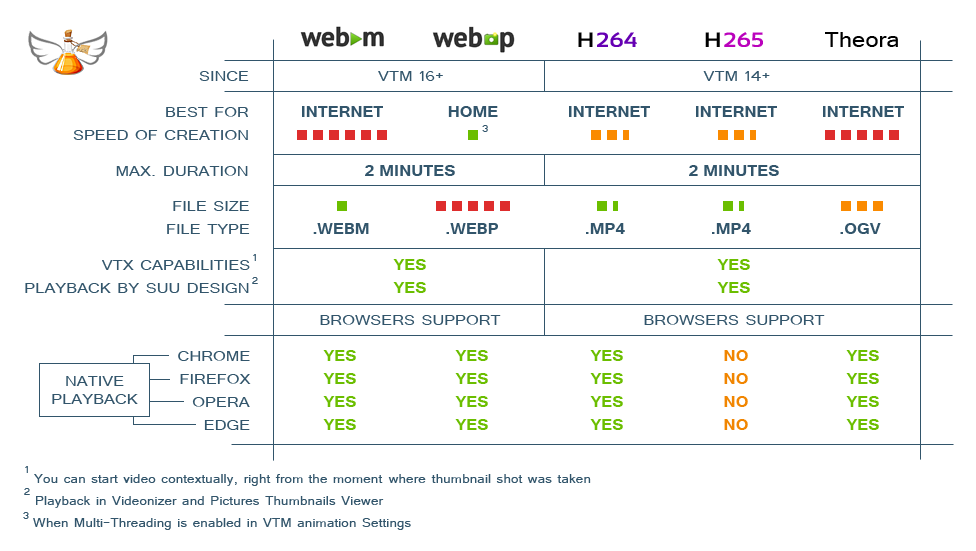 changed: The program stores all working files outside of the installation directory. These are log files and 4 folders: Logs, Options, Settings and Internet. changed: The default installation paths for the 64 and 32-bit versions have become "C:\Program Files" and "C:\Program Files (x86)" respectively. changed: Few cosmetic changes. fixed: Sometimes Windows Mapped Network Drives were not listed in the Folder Browser. fixed: Redundant vertical scrollbar in Codec-Independent Choose Shots Manually interface. fixed: Few English grammar and spelling corrections.
----- Changes in Pictures Thumbnails Viewer 5.2.0.0 -----
fixed: Sometimes Windows Mapped Network Drives were not listed in the Folder Browser. special note: If you use Pictures Thumbnails Maker (PTM), you may want to install its latest version too, because PTM uses its own instance of the Viewer. Windows launches the Viewer from the location from which the latest PTM or VTM launch happened.Updated to v15.3.0.0
new: The "Delete broken Screenlists in the Output Folder" setting has been added under the "Save thumbnails to your Folder" setting. When enabled, VTM checks for broken Screenlists in the Output folder on the start of the job. The list of files to check is based on the current VTM settings:- if VTX is enabled, then *.vtx are checked;
- if Classic is enabled, then *.jpg, *.jpeg, *.bmp, *.png, *.tiff are checked;
- if Animation is enabled then *.mp4, *.webm, *.webp, *.ogv are checked.
new: The "Delete broken Screenlists in the Output Folder" setting has been added to the "Quick Settings" on the main window. The default value is OFF. new: The "Show Remote Paths for Network Drives in the Folder Browser" setting has been added to the "Environment" -> "Appearance" window. The default value is ON. changed: The height of the main window has been increased. changed: Few cosmetic changes. fixed: Slow startup time when network drives are not available.----- Changes in Pictures Thumbnails Viewer 5.1.0.0 -----
new: VTX feature support for PotPlayer (32 and 64-bit) has been added. new: It is possible to zoom with the number-row's +/- keys in addition to the number-pad's +/- keys. new: The "ESCAPE key minimizes the window" option has been added to the Preferences (CTRL+P) under the "Viewer behavior" section. new: The "Show Remote Paths for Network Drives in the Folder Browser" setting has been added to the Preferences (CTRL+P). The default value is ON. fixed: Slow startup when network drives are not available. special note: If you use Pictures Thumbnails Maker (PTM), you may want to install its latest version too, because PTM uses its own instance of the Viewer. Windows launches the Viewer from the location from which the latest PTM or VTM launch happened.Updated to v15.2.0.1
changed: Simple Matrix dimensions have been increased from 50x50 to 70x70. fixed: Paths starting with two backslashes (\\something) were treated incorrectly. fixed: Redundant scrollbars in Choose Shots Manually interfaces. fixed: Possible Ultimate engine crash under certain circumstances.Updated to v15.2.0.0
special note: Microsoft .NET Framework 4.8+ is required to run the application. new: Ultimate and Crystal engines have become 10% faster. new: Environment -> Appearance: The "Horizontal scrolling for long paths in the Main Window".It allows you to rearrange the columns in the main window and get the horizontal scrolling for paths:
new: The main context menu: "Open Result containing Folder" menu item. new: Use "Home" and "End" hotkeys in the Main window to jump to the very beginning and to the very end of the list. "Shift+Home" and "Shft+End" do the same but with the selection. changed: Faster addition of files to the program, faster selection and deletion of items. changed: Environment: The "Appearance" button is introduced. The "Restore last window position after restart" was moved there. changed: Environment: The maximum Timeout value for screenlists has been increased to 60 mins. For animations - to 120 mins. fixed: Jerky OGV (Theora) animations for the 64-bit version of the application. fixed: Redundant scrollbars in Choose Shots Manually interfaces. fixed: WebVTT didn't take into account the "Save each job into its own Folder" setting. Nvidia card users: The minimum required Nvidia driver version for H.264 / H.265 animations is 456.71 or newer. AMD card users: The minimum required Adrenalin driver version for H.264 / H.265 animations is 20.2.1 or newer.Updated to v15.1.0.0
new: External Engines (1 and 2) have become much more stable. new: The Resolution string for Anamorphic videos prints as follows: 1440x1080 @ 1920x1080. changed: Update window has been changed. changed: Currently used Engine is printed to the Log file. fixed: Wrong aspect ratio for Anamorphic videos when using External Engines (1 and 2). fixed: Console version of the previous release did not work for External Engines (1 and 2). fixed: Context menus did not popup in Choose Shots Manually interfaces. fixed: Anamorphic videos were displayed in the wrong aspect ratio in Choose Shots Manually interfaces. fixed: Rare random freezes of the application.Updated to v15.0.0.0
new: 32 and 64-bit versions of VTM are available. The 64-bit version has no 32-bit memory limitations. The 64-bit version is shipped with internal (embedded) codecs as well as the 32-bit version. 64-bit version is the option of choice for the rest of cases. Please note: when you use Engines 1 and 2, they use your external codecs, so you need 32-bit codecs to be installed in your system for 32-bit versions of VTM and 64-bit codecs to be installed for 64-bit versions of VTM. new: Ultimate engine: Hardware acceleration is added to the Codec-Independent "Choose shots Manually" interface. new: Ultimate engine: Improved hardware acceleration could also be noticed when processing, for instance, a 15x15 matrix for a 20 minutes length video (when the frames in-between key-frames are needed). The new version is 2x faster in such cases. new: Environment Settings: Timeouts. You can set the time limit to create a single screenlist within (15 sec - 20 min) range. You can set the time limit to create a single animation (30 sec - 40 min). When the timeout is reached, VTM skips to the next item in the main list. new: The "Timer" label is added to the top right part of the main window. It shows the current time progress and the Estimated Time of Completion after completion of the first item in the list. new: Options: "Extend Matrix" checkbox in added to "Advanced Timeline Control" window. Enable it to let VTM add additional rows to your matrix when the "Specific Timestep" exceeds the matrix. new: Tooltip hints for the main window items are working during the video processing. Hover the first column to get details (the current state, time spent for the main output, time spent for the animation). new: Choose shots manually: Drag & Drop is working for snapping frames as well as for swapping already taken shots. new: Environment Settings: *.RAM checkbox is added to the "Video Extensions". new: Video card name is written to the Diag.log file at startup. changed: "MultiFiles" checkbox now depends on the new "Extend Matrix" option. Disable the "MultiFiles" checkbox to get the main screenlist only. Enable it to get "MultiFiles" also. changed: Tech details: FPS is always printed with 2 fractional digits. changed: Tech details: Video bitrate measure unit is "kb/s". changed: Tech details: Audio bitrate measure unit is "kbps". changed: Few cosmetic changes. fixed: VTM freezes when creating animations with invalid parameters (too narrow, too large, etc.). fixed: Some animations could freeze the application after cancellation at the very beginning. fixed: VTM failed to create long WebM animations with audio under certain circumstances. fixed: GIF animations did not respect 100% / 50% / 33% framerate settings. fixed: Command line interface did not support relative paths to video files correctly. fixed: Wrong processing order after sorting of items in the main window list.----- Changes in Pictures Thumbnails Viewer 5.0.0.0 -----
new: 32 and 64-bit versions of the Viewer are introduced. The 32-bit version is shipped with 32-bit versions of VTM. The 64-bit version is shipped with 64-bit versions of VTM. new: Support for the new Pictures Thumbnails Maker features is added. fixed: The initial picture size was wrong when the first item to view at startup was the animation. special note: If you use Pictures Thumbnails Maker (PTM), you may want to install its latest version too, because PTM uses its own instance of the Viewer. Windows launches the Viewer from the location from which the latest PTM or VTM launch happened.Updated to v14.2.0.0
please note: Microsoft .NET Framework 4.5+ is required to run the program. new: Support for animations in MP4 format (H.264 and H.265) for AMD Radeon Series is added. new: "Force 16:9" checkbox is added to Options window. When ON, VTM adds black bars to the top/bottom or left/right side of frames to keep 16:9 aspect ratio. new: "Use it for 16:9" checkbox is added next to Background color in Options window. By default, VTM uses Black bars for "Force 16:9". Set this checkbox ON to use background color for bars. new: The total count of Audio tracks and theirs languages are printed to Audio details string. new: [LANGS] tag is added to comment line. Use it to print audio languages info. new: "Subtitles" checkbox is added to Options window. When ON, a new line is printed to Technical details with the total count of Subtitles and theirs languages. new: [SUBS] tag is added to comment line. Use it to print subtitle details. changed: [AUDIO] tag is comment line now prints audio details without track languages. changed: Video/Audio tech strings are rearranged a bit. Double colon is introduced as a new separator. Here is an example of such output: changed: Tech details are printed transparent when your custom picture is used as a background. changed: Cut edges are filled with the current background color instead of white when "Draw a White Border" effect is enabled. fixed: VTM failed to create short animations with sound under certain circumstances.----- Changes in Pictures Thumbnails Viewer 4.0.0.0 -----
changed: Shift+Del hotkey is changed to Ctrl+Shift+Del for safety. fixed: Navigation arrow keys were not working in Full Screen mode without Taskbar. special note: If you use Pictures Thumbnails Maker (PTM), you may want to install its latest version too, because PTM uses its own instance of the Viewer. Windows launches the Viewer from the location from which the latest PTM or VTM launch happened.Updated to v14.1.0.0
new: Embedded codecs are updated to support the latest video formats. new: "Auto with Advanced Timeline Control" button is added to codec-independent "Choose shots manually" interface. new: [VIDEO] tag for comment line to print Video details. changed: Maximum tile size is increased. changed: [CREATED] tag is back to comment line in addition to previously introduced [CR] tag. changed: Default size unit for comment line is changed from bytes to megabytes. changed: More diagnostic information is printed to Diag.log file. fixed: Audio was unsynced or not created for long animations under certain circumstances. fixed: VTM failed to create thumbnail sheets under certain circumstances.----- Changes in Pictures Thumbnails Viewer 3.2.0.0 -----
new: You can switch between Full Screen and Windowed modes in Preferences (hotkey: F11). new: New "Show Windows Taskbar in Full Screen mode" checkbox is added to Preferences window. new: VTX feature support for SMPlayer (9.5+) is added. special note: If you use Pictures Thumbnails Maker (PTM), you may want to install its latest version too, because PTM uses its own instance of the Viewer. Windows launches the Viewer from the location from which the latest PTM or VTM launch happened.Updated to v14.0.0.0
new: 3 new animation formats are added: MP4 (H.264 (AVC), H.265 (HEVC)) and OGV (Theora). Please refer to the table below for details (click to view full size image):
You can select animation format in Animation Options and Settings:
new: You can create H.264/H.265/OGV animations using VTM right from Videonizer 6 or higher. new: You can use "Choose shots manually" interface to select which frames are to be used as a starting point for animation sections. So you can create any animation you want. You can use right mouse button on already selected frame to set the duration of the section. Sections are animated in order of appearance in "Choose shots manually". To discard the section from the animation just select "Not animate" in Tile context menu. new: You can also set the default duration for all further frames snapped in "Choose shots manually" interface using special new button right below the "Snap" button. new: 6 new tags are added to Options for the Comment.They are: [NAME] (Filename), [SIZE] (Filesize), [DUR] (Duration), [WxH] (Resolution), [FPS] (Framerate), [AUDIO] (the number of audio streams and channels).
new: *.OGV checkbox is added to Settings -> "Add files with the following extensions". changed: The design of "Animation Quality" indicator has changed. changed: "MultiFiles for Specific timestep" checkbox was added to "Quick Settings" panel on the main window. changed: VTM asks for "Output folder" when selected one does not exist. changed: Video files (animations) produced by VTM can not be added to VTM anymore (there is no sense in doing that). changed: "_VTM" suffix is added to all animations (except of WebP) created by VTM. changed: "Change" link is added to "Comment" in Option. It allow to modify your custom comment in a wider textbox. fixed: Animation creation freezed for source video files without any audio stream. fixed: FPS was not showed for certain video files.----- Changes in Pictures Thumbnails Viewer 3.1.0.0 -----
new: Playback of VTM-MP4 (H.264 and H.265) and VTM-OGV animations is added. fixed: "Out of memory" issue for long animations is fixed. fixed: Double click on a Tile worked incorrectly on some environments. fixed: Ampersand symbol (&) in paths was interpreted incorrectly. special note: If you use Pictures Thumbnails Maker (PTM), you may want to install its latest version too, because PTM uses its own instance of the Viewer. Windows launches the Viewer from the location from which the latest PTM or VTM launch happened.Updated to v13.0.0.1
new: Animated thumbnail sheets are enables for all cases of Choose shots manually.----- Changes in Pictures Thumbnails Viewer -----
new: The Viewer searches for original pictures beside the PTX-file when absolute links are broken for some reason. The Viewer does not change the PTX file itself. If you want to change the broken link permanently (it has sense for Tile substitution), please check the feature below. new: "Permanently substitute missing absolute paths for PTX Tiles to existing relative ones" option is added to Preferences (Ctrl+P). The option changes PTX-files permanently. "Tile Substitution" and "Auto-Substitution after Deletion" features will use PTX-file folder for affected Tiles. special note: If you use Pictures Thumbnails Maker (PTM), you may want to install its latest version too, because PTM uses its own instance of the Viewer. Windows launches the Viewer from the location from which the latest PTM or VTM launch happened.Updated to v13.0.0.0
new: WebP animation creation speed is 2x times faster than before.WebP is natively supported by all most popular browsers. Firefox and Edge joined the club in late 2018 / early 2019. Please consider the following picture when choosing between WebM and WebP:
new: You can define a custom suffix for output files in Environment window. The suffix is added to the end of each file name, just before the final extension. changed: This one is related to Animation parameters form opened in Options window. Click on the top right button shows the comparison table between WebM and WebP types of animation.----- Changes in Pictures Thumbnails Viewer -----
new: WebP animation playback is improved. new: Support for new Pictures Thumbnails Maker "MultiFiles" feature is added. new: VTX feature support for KMPlayer 64-bit is added. special note: If you use Pictures Thumbnails Maker, you may want to install its latest version too, because PTM uses its own instance of Pictures Thumbnails Viewer.Updated to v12.1.0.2
new: The Folder browser has been improved. The Address bar, which is located at the top of the Folder browser, displays the path of the currently selected folder. You can paste your path to go to a different folder. new: You can use CTRL+Left Mouse Button click to select multiple folders in the Folder browser.Updated to v12.1.0.1
changed: VTM does not overwrite existing animated screenlists by a temporary animation file anymore. VTM saves only ready to use animated screenlists. That prevents the existing file of being overwritten in case of job cancellation. changed: Audio/Video information module is updated.Updated to v12.1.0.0
new: "Advanced Timeline Control" panel in Options. It contains "Advanced Timeline Control" button when rules are not set. It contains rule indicators with values when rules are set. You can set a lot of timeline control rules using the panel.
new: You can Randomize actual positions at the rate of selected percent of the current time step. new: You can Cut first X% or X seconds of the video. new: You can Cut last X% or X seconds of the video. new: You can Capture the first frame at the very start. new: You can Capture the last frame at the very end. new: You can Consider first X% or X seconds of the video as Intro and take shots rarely or oftener. new: You can Consider last X% or X seconds of the video as Outro and take shots rarely or oftener. new: You can specify fractional parts of seconds in "Advanced Timeline Control" window. new: Please read popup hints (tooltips) over controls on the new panel and in "Advanced Timeline Control" window to get more info. changed: "Specific timestep" checkbox was moved to "Advanced Timeline Control" window. changed: "Try substituting for any color frames" checkbox was moved to "Advanced Timeline Control" window. An indicator is added to "Other Effects" section of Options window. changed: "MultiFiles for Specific timestep" checkbox is duplicated in Environment and "Advanced Timeline Control" windows. changed: Codec-independent engines (Ultimate and Crystal) produce shots in original color matricies. fixed: Minor bugs are fixed.Updated to v12.0.0.1
fixed: "Choose shots manually" interface failed to process AVI files and MPEG4 format. fixed: Ultimate engine captured wrong shots for time steps less than 3-4 seconds.Updated to v12.0.0.0
new: Codec-independent "Choose shots manually" interface. You can go through keyframes or go frame by frame on the fly.
New interface is fast and free for all users (nevertheless, an owl logo is still present for non-activated users). Just select a videofile in the main list and press Hotkey 1 to open the interface, or select "Choose shots manually" in the right mouse button context menu. Please check tooltips for more info. new: Maximum number of animation sections is increased from 12 to 100. new: You can turn ON/OFF captions by using "Captions in [English]" option in "Technical details" section. On the other hand, you can select a language of captions when the option is ON.
Possible values are: English, German, Russian, French, Turkish, Italian, Korean, Japanese and Chinese. new: Animation creation speed is increased a bit. new: Experimental "watchdog" for Ultimate engine is implemented. It should not allow the program to freeze while processing video files with defects. Please provide feedback on the function. new: New visual style for checkboxes and radiobuttons. It has become easier to understand relations between controls. changed: Old "Choose shots manually interface" is moved to the second position in the mouse context menu (Hotkey 2). changed: Audio/Video information module is updated. changed: Few cosmetic changes. fixed: Wrong timestamps for Ultimate Engine.----- Changes in Pictures Thumbnails Viewer -----
new: New visual style for checkboxes and radiobuttons. It has become easier to understand relations between controls. changed: "Use the default video player for that type of video" option is improved. special note: If you use Pictures Thumbnails Maker, you may want to install its latest version too, because PTM uses its own instance of Pictures Thumbnails Viewer.Updated to v11.0.0.3
new: You can create Screenlists for remote video files without downloading them (you can add HTTP URLs to the program). Here is an example of such URL:http://clips.vorwaerts-gmbh.de/big_buck_bunny.mp4
new: You can also add URLs via "Import list of files to process" button in the upper right corner of the main window. The default output folder for URLs is the "Internet" folder in the VTM's installation directory. You can redirect the output to your own folder as usual. fixed: WebM audio was not synced with video for larger files.----- Changes in Pictures Thumbnails Viewer -----
new: VTX support for remote video files (HTTP URLs). special note: If you use Pictures Thumbnails Maker, you may want to install its latest version too, because PTM uses its own instance of Pictures Thumbnails Viewer.Updated to v11.0.0.2
fixed: Creation of WebM files with Audio longer than 3 seconds freezed the program in many cases.Updated to v11.0.0.1
changed: Multi-Threading support for animations is extended for wider variety of computers. fixed: Creation of WebM with Audio freezed the program in many cases.Updated to v11.0.0.0
VTM 11 introduces advanced animation features!
new: You can create WebM animations with sound. new: You can select between Single frame animations and Animations within a Thumbnail sheet. new: You can create continuous Single frame animations in GIF format (like previously in WebM or WebP). new: You can reduce filesize of GIF animations and set 100%, 50% or 33% of the original framerate. changed: Old GIF slideshows are created with "_slideshow.gif" suffix at the end of filename to distinguish from new continuous GIF animations. changed: Animation settings window is redesigned. special note: If you use Videonizer, you may want to install its latest version to be able to generate new types of animations right from Videonizer.Updated to v10.0.0.5
This update is mainly for great new Videonizer 4 with its Multimedia view.
new: Using this version of VTM you can create animated screenlists right in Videonizer 4. changed: Audio/Video information module is updated. fixed: WebP animations with diacritic symbols in path were created incorrectly. fixed: Video framerate was parsed incorrectly in very rare cases.----- Changes in Pictures Thumbnails Viewer -----
new: Support for WebP with non alpha transparency is added. fixed: WebP animations with diacritic symbols in path were opened incorrectly. special note: If you use Pictures Thumbnails Maker, you may want to install its latest version too, because PTM uses its own instance of Pictures Thumbnails Viewer.Updated to v10.0.0.4
----- Changes in Pictures Thumbnails Viewer -----
new: The Viewer tries to guess video location in "Locate video" dialog. fixed: Jerky WebM playback in few previous releases of the Viewer. special note: If you use Pictures Thumbnails Maker, you may want to install its latest version too, because PTM uses its own instance of Pictures Thumbnails Viewer.Updated to v10.0.0.3
fixed: You can specify a drive letter (C:, D:, E: and so on) as a valid command line argument.----- Changes in Pictures Thumbnails Viewer -----
fixed: Previous release of the viewer contained several bugs in its new feature. special note: If you use Pictures Thumbnails Maker, you may want to install its latest version too, because PTM uses its own instance of Pictures Thumbnails Viewer.Updated to v10.0.0.2
new: Finally, I managed to get Ultimate engine working as it was supposed to be in VTM 10.0.0.0.Rare Ultimate engine failures are fixed as well as "Choose shots manually" flickering without opening a file. Please enjoy ;)
new: "/nc" option is added to command line interface (close console automatically after completion). new: "/hidden" option is added to command line interface (create picture files with hidden attribute). changed: From now on tile area in "Choose shots manually" interface is fixed with a vertical scrollbar. changed: Comment field can be printed to text output files (CSV, XML, TXT). changed: Watermark position for the right side of the picture is moved 1 pixel right. fixed: From now on maximum Simple Matrix size is limited to 8x12 when Animation is enabled. fixed: Wrong WebM framerate detection in some cases. fixed: "Choose shots manually" interface lost the first custom chosen shot for Special Matricies.----- Changes in Pictures Thumbnails Viewer -----
new: The Viewer tries to guess video location for a broken link by the name of VTX file. changed: The Viewer tries to show next picture in the folder when you delete current picture. special note: If you use Pictures Thumbnails Maker, you may want to install its latest version too, because PTM uses its own instance of Pictures Thumbnails Viewer.Updated to v10.0.0.1
changed: "General CSV-file" output format has been changed. Now it looks like a real CSV file ;) changed: Audio/Video information module is updated. fixed: Two bugs related to Command Line Interface and WebM creation.Updated to v10.0.0.0
VTM introduces advanced animation features!
You can create up to 2 minutes of animated thumbnail sheets and combine animations from several part of your video within a single thumbnail sheet.
Framerate is up to 60 FPS.
new: VTM introduces advanced animation features.
New animation features demonstration
https://www.youtube.com/watch?v=UmFFIeDQi4c
Tip: You can also find a tech demo of upcoming Videonizer 4 in the video above.
Please find the difference between animation formats in the table below:
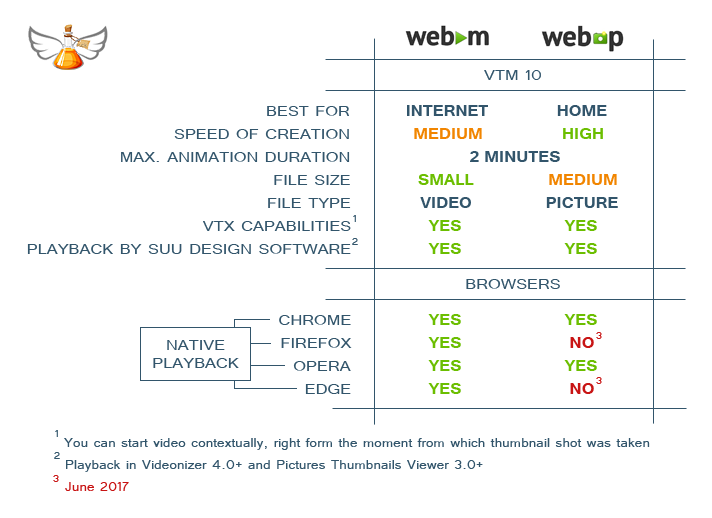
https://www.youtube.com/watch?v=UmFFIeDQi4c
Tip: You can also find a tech demo of upcoming Videonizer 4 in the video above.
Please find the difference between animation formats in the table below:
new: Animation creation performance is improved significantly. new: "Animation" section is added to Options window. new: You can view basic animation parameters in "Other Effects" section of Options window. new: Buttons to Import/Export list of files are added to the main window. new: Experimental: Video rotation detection is added. changed: "Core" section in Environment window is redesigned. changed: APNG animation format was removed. changed: Audio/Video information module is updated. changed: Few cosmetic changes. fixed: Small memory leak in previous versions of VTM. fixed: "Restore last window position after restart" option did not work well in some cases.----- Changes in Pictures Thumbnails Viewer -----
new: Playback for VTM WebM animations is added. VTX feature works for WebM as well. new: Animation framerate is taken into account. Maximum supported FPS is 60. new: You can Copy corresponding video file to desired location right from the Viewer. new: VTX support for "MPC - BE (Black Edition)" is added. changed: Animation playback was re-engineered to consume much more less computer resources. fixed: Several rare bugs were fixed. special note: If you use Pictures Thumbnails Maker, you may want to install its latest version too, because PTM uses its own instance of Pictures Thumbnails Viewer.Updated to v9.1.0.0
VTM introduces great new feature - animated video thumbnail sheets!
Previously, you have been able to produce animated thumbnail sheets using WebM and APNG formats.
new: VTM introduces the third animation format - WebP.WebP format is best for Home usage (it has VTX capabilities, small filesize, the quality is great, up to 10 seconds of animation). It is fully supported by SUU Design software.
WebP demonstration
https://www.youtube.com/watch?v=3smiOjvKnao
Please find the difference between animation formats in the table below:
Only WebM and WebP animation formats left in VTM version 10, so the actual comparison chart is the following:
https://www.youtube.com/watch?v=3smiOjvKnao
Please find the difference between animation formats in the table below:
Only WebM and WebP animation formats left in VTM version 10, so the actual comparison chart is the following:
new: WebM/APNG/WebP selector is added to Environment window. More info in tooltip pop-up windows. changed: Audio/Video information module is updated. changed: Few cosmetic changes. fixed: Rare Ultimate engine crashes are fixed. fixed: VTM did not allow to select animation duration greater than 5 seconds for WebM animation format. fixed: VTM is used by Videonizer's "Generate and add Screenslists" feature. That feature used to stop responding after proccesing certain amount of files in a batch.----- Changes in Pictures Thumbnails Viewer -----
new: Support for WebP animations is added. new: "Associate .WEBP extension with this program" button is added to "Preferences..." window. special note: If you use Pictures Thumbnails Maker, you may want to install its latest version too, because PTM uses its own instance of Pictures Thumbnails Viewer.Updated to v9.0.0.0
VTM introduces great new feature - animated video thumbnail sheets!
You can produce animated thumbnail sheets using two completely different formats: WebM and APNG.
WebM format is best for Internet (filesize is small, the quality is great, it is supported by all browsers).
Animated video thumbnail sheets
https://www.youtube.com/watch?v=lcoFIrqtVtM
Here is a demonstration page with results.
And here is a scaled 4-seconds WebM example (use video controls to see it fullscreen):
Only WebM and WebP animation formats left in VTM version 10, so the actual comparison chart is the following:
https://www.youtube.com/watch?v=lcoFIrqtVtM
Here is a demonstration page with results.
And here is a scaled 4-seconds WebM example (use video controls to see it fullscreen):
Differences beetween WebM and APNG types of animation are shown in the table below:
Only WebM and WebP animation formats left in VTM version 10, so the actual comparison chart is the following:
new: "Animate Tile number" checkbox is added to "Other Effects" section in Options window. You can enter the desired number in the field below. new: "Duration" selector is added to the same section. You can set the duration of animation there. The option is available only for WebM format. Duration is set to 2 seconds for APNG format. new: WebM/APNG selector is added to Environment window. More info in tooltip pop-up windows. new: Support for WebM video extension is added. new: "Tutorials" button is added to the main window. It leads to "Tutorials" page on SUU Design site. changed: "Incremental filenames" and "Save each job into its own folder" settings are added to "Quick settings" panel on the main window. changed: Audio/Video information module is updated. changed: Few cosmetic changes. fixed: "Technical details" section was placed to wrong place under certain circumstances.----- Changes in Pictures Thumbnails Viewer -----
new: Support for APGN animations is added. new: "Browse only VTX file" option is added to "Preferences..." window. All other types of files will be ingored. new: Viewer version is shown in "Preferences..." window. new: Ctrl+P hotkey to open "Preferences..." window. special note: If you use Pictures Thumbnails Maker, you may want to install its latest version too, because PTM uses its own instance of Pictures Thumbnails Viewer.Updated to v8.0.0.2
new: OGM and AVS extensions are added to "Add files with the folowing extensions" section. changed: JPG, PNG, BMP, TIFF selector is back. You can choose core format in Environment window (core format is basic both for VTX and Classic output). changed: Audio/Video information module is updated. fixed: "Technical details" section was placed to wrong place under certain circumstances. fixed: "Combine all files into one picture" did not work properly when "Incremental filenames" feature was set ON.----- Changes in Pictures Thumbnails Viewer -----
new: "Close existing Video player instances before opening a new one (recommended)" is added to "Preferences..." window. new: "Delete Both - Video and Picture" option is added to right mouse button context menu (Shift+Delete hotkey). fixed: Non-alphabetical order of files in the Viewer under certain circumstances. special note: If you use Pictures Thumbnails Maker, you may want to install its latest version too, because PTM uses its own instance of Pictures Thumbnails Viewer.Updated to v8.0.0.1
new: Support for Windows 10 is added. changed: "Try substituting for black frames" feature is replaced by "Try substituting for any color frames" feature. That means the program will try to substitute any nearly black/white/green/yellow/... frame to another. New algorithm is more powerful and works 30% faster than the old one. changed: Audio/Video information module is updated. fixed: VTM did not process Special matricies with only 1 row or only 1 column correctly. fixed: Rare Ultimate engine crashes are fixed. special note: If you use Pictures Thumbnails Maker, you may want to install its latest version too, because PTM uses its own instance of Pictures Thumbnails Viewer.Updated to v8.0.0.0
Thank you for all your requests and responses, you really help me to keep projects up to date.
new: ULTIMATE engine! Lightspeed fast, codec-independent engine. ULTIMATE engine is ten times faster than the former leader - Extreme engine. Please note once again, Ultimate engine uses built-in codecs, so you do not need to care about codecs anymore. The speed is really amazing.You can find YouTube demo and Engine speed comparison chart below.
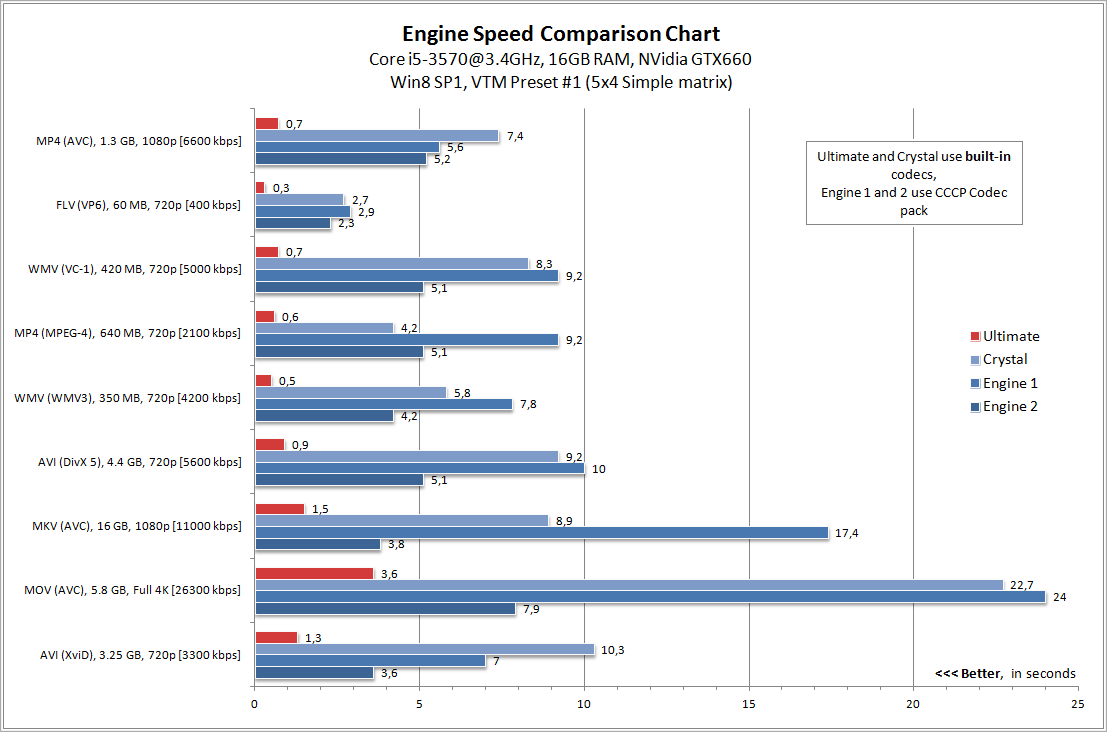
Ultimate Engine in action
https://www.youtube.com/watch?v=RHz06Lnvj7Q
new: "Secondary engine" setting is added to Environment window. Secondary engine is used to backup Primary. It is used automatically when Primary engine fails. Then the program switches back to Primary. new: Generate thumbnail sheets IN A BATCH right from Videonizer (another my project) version 3.0.0.0 or later! Select any quantity of Videonizer items, open a context menu and locate "Screenlists" section. Thumbnail sheets will be generated and added to Videonizer items automatically. You can cancel the job at any time. Also you can select any VTM Options and VTM Settings in Videonizer Settings window. Interaction between VTM and Videonizer is demonstrated below:Quick screenlists in Videonizer
https://www.youtube.com/watch?v=jDfrhFcZqBo
https://www.youtube.com/watch?v=jDfrhFcZqBo
new: "Export for Videonizer" button is added to Environment window. It allows you to save VTM Settings to a *.VTS file, which can be used later in Videonizer. new: "Incremenal filenames" checkbox is added to Environment window. When the feature is enabled, VTM will never overwrite existing files, but will add incremental suffix to save file under unique name. Works only when "Skip existing" feature is disabled. new: Console version of the program has become more functional. From now on it displays the current progress, supports cancellation of the job and takes into account ALL setting from GUI Environment window ("Skip existing..." feature and so on). If you want to run the job as a pure background process, you can specify "/silent" flag. In that case the job can only be stopped by killing the process in Windows Task Manager. new: The progress bar is drawn for "Combine all files into one picture" feature too. new: State indicator for the last "Combine all files into one picture" result file is added. Also you can click on the indicator to try to view last result picture. new: Since an attempt to overwrite a read-only file is considered as a failure, a new icon is added to datagridview to distinguish read-only states from engine failures. new: Escape button can be used to cancel time-consuming process of adding folders to the list. You can also use Alt+X hotkey. new: "LOG" button is added to the main window. The button opens Diag.log file from the program's folder. CTRL+Click on the button clears the log. new: Each console job log is stored into a separate log file in the program's folder named "Log". new: Turkish hints translation is added to the program. changed: The font of the program has become bigger. changed: Old, slow and rarely used "Engine 2" is replaced by an average speed engine, based on the former Extreme engine. "Engine 2" becomes the second engine that is using external codecs (beside "Engine 1"). changed: "Combine all files into one picture" has become failure-independent. VTM creates a result picture in any case. The program uses embedded stub-image for each failed/missed file. changed: From now on "Create animated GIF" feature does not require "Output each Tile to a separate file" feature to be turned ON. Nevertheless, settings from "Output each Tile to a separate file" section are still applicable to "Create animated GIF". Moreover, GIF files can be generated without VTX or Classic output. changed: More hints (tooltips) are added to Environment window. Tooltip is a pop-up window that displays information for an element in the interface. changed: "Diag.log" file in the program's folder has become more informative and user-friendly. changed: New Folder Browser dialog is used to select "Output Path" in Quick Settings, as well as in Environment window. changed: "Memory economy mode" is removed from Environment window. From now on it is always set to ON. changed: A confirmation dialog, asking if you really want to cancel changes is added to "Choose shots manually" window. changed: Few cosmetic changes. changed: Audio/Video information module is updated. fixed: There were rare false-positive reports from some anti-virus software. fixed: The program did not show preview results for skipped items. Hint: To preview a result for processed item, click on its "State" column (the first one in the datagrid), or select its row and open a context menu for it. Also you can use ~ (tilde) hotkey for any single-selected processed item. fixed: Support of "ClearType off" Windows font smoothing for 100% and 150% Windows scaling mode is added. 125% Windows scaling mode still may produce displacements on the forms when "ClearType off" Windows setting is turned off. fixed: Malfunction of "Auto" button in "Choose shots manually" window if there were more than 12 rows in the matrix.----- Changes in Pictures Thumbnails Viewer -----
new: The Viewer has become MUCH MORE faster. You may notice it by cycling through pictures in a folder. new: "Preferences..." context menu item is added. There you can configure "Double Left Mouse Button click behavior". For instance, you can select preferred Video Player and force the Viewer to open video at selected position in a double-click, without any questions. Selected Player will be used everywhere in the Viewer. The feature is demonstrated below. new: "Copy Picture to..." and "Move Picture to..." context menu items are added. new: "File Info" context menu item is added. new: Supports of Media Player Classic (Home Cinema) 64 bit. changed: "Zoom" context menu items are reworked. special note 1: If you use Pictures Thumbnails Maker, you may want to install its latest version too, because PTM uses its own instance of Pictures Thumbnails Viewer. special note 2: Stay tuned and please spread the word about VTM, Videonizer and PTM if you like them.Updated to v7.1.0.0
new: "Choose shots manually" interface is now available for all types of matrices (Simple, Special/Custom). new: "White borders" effect is now available for all types of matrices (Simple, Special/Custom). new: Editable leading and trailing text blocks for TXT output are added to Environment window. new: Turkish translation is added to the program. new: "SHIFT+Delete" hotkey removes items form the list of files without questions. changed: Audio/Video information module is updated. changed: Few cosmetic changes. fixed: Pictures Thumbnails Viewer built wrong context menus for moved video and vtx files. fixed: Ampersand symbol (&) in filenames was interpreted incorrectly. special note: If you use Pictures Thumbnails Maker, you may want to install its latest version too, because PTM uses its own instance of Pictures Thumbnails Viewer.Updated to v7.0.0.0
new: "Timeline Flow" section is added to "Special Matrix" window. It consists of three options. Select "Row by Row (default)" option to fill rows one by one, in a classic way. Select "Column by Column" option to fill the first column, then the second one and so on, like never before! Also you can select "Shuffle times" option. New options allow you to stagger big tiles effectively. new: An indicator of "Timeline Flow" selection is added to Options window. new: Three "Slots for your Sets" are added to "Special Matrix" window. Initially, slots are empty. You can save your custom matricies to these slots. Hover the cursor over a slot to preview its content. new: Double left mouse button click on a regular (non-VTX and non-PTX) picture in Picture Thumbnails Viewer goes a step back in history. It makes PTX-browsing more handy. Double click on a tile to view its source, double click on the source picture to get back to your PTX sheet. changed: Few cosmetic changes. fixed: "Clear completed" label did not appear when all items were skipped during processing. special note: If you use Pictures Thumbnails Maker, you may want to install its latest version too, because PTM uses its own instance of Pictures Thumbnails Viewer.Updated to v6.5.0.2
new: "FPS" checkbox is added to the Options window. The option allows you to add fps value to the resolution string (to make the line a bit more informative). So, if you want fps value to be presented on your pictures, you may use that option and don't waste space for additional "Video tech" line. new: Double middle mouse button click in VTX viewer starts the video with your system's default associated video player. If you target a tile, the video starts from the moment from which the thumbnail shot was taken! new: Blue icon is used to distinguish skipped items from normally processed items (green icon). new: CTRL+Shift+Home, CTRL+Shift+End combinations can be used to select rows in the list of files to process. changed: The maximum number of rows in "Construction Set" feature is increased from 10 to 12. changed: "Skip video file if ALL required pictures EXIST on the disk" feature speed is increased significantly for Extreme engine. changed: Few cosmetic changes. fixed: Pause/Continue/Stop control buttons did not work properly after engine failure in most cases. fixed: "Use Crystal engine automatically if selected engine have failed" feature did not work properly for Extreme engine. fixed: "Skip video file if ALL required pictures EXIST on the disk" feature did not work when "Add time for filename" checkbox was set in Environment window. fixed: "Skip video file if ALL required pictures EXIST on the disk" feature did not work properly when "Specific time" checkbox was set in Options window. special note: If you use Pictures Thumbnails Maker, you may want to install its latest version too, because PTM uses its own instance of Pictures Thumbnails Viewer.Updated to v6.5.0.0
new: New Folder Browser dialog allows you to select multiple folders. You can also toggle "Add SubFolders recursively" feature ON and OFF right on the dialog form. "Switch to classic Browser" button allows you to select a single folder in the old-fashioned way (this also gives you networking capabilities, if necessary). new: "GB" checkbox is added to the Options window. It allows to stamp file size in Gigabytes on thumbnail sheets. new: From now on you can delete related video file right from the VTX viewer. new: Installer detects if the required .NET Framwork is installed and if it is not - it will prompt, download and install the required package. new: "Clear selected" button is added to the main window, it allows to remove selected items from the list of files ("Del" hotkey). new: Support for MXF and MPE video file extensions is added. changed: "Skip video file if ALL required pictures EXIST on the disk" feature speed is increased significantly. changed: Warning message is added to the main window. It says "To prevent crashing, it is recommended not to playback any video files during thumbnail sheets creation". changed: Hotkey to add folders is changed: Shift+Ins -> Ctrl+Ins. changed: Audio/Video information module is updated. changed: Few cosmetic changes. fixed: Crystal engine used wrong aspect ratio for certain video file formats. special note: If you use Pictures Thumbnails Maker, you may want to install its latest version too, because PTM uses its own instance of Pictures Thumbnails Viewer.Updated to v6.4.0.4
quickfix: Crystal Engine did not work in 6.4.0.3. fixed: Direct click on a radiobutton in Special Matrix window did not redraw matrix appearance in Construction Set.Updated to v6.4.0.3
new: "Sort timeline" button is added to "Choose shots manually" interface. changed: Vertical and horizontal scrollbars are added to "Choose shots manually" interface for small screen resolutions. changed: Audio/Video information module is updated. fixed: Two bugs related to "Choose shots manually" interface.Updated to v6.4.0.2
changed: Both "Choose shots manually" interfaces are updated to support video resolutions up to 4800x3200. fixed: Console version of the application (versions 6.4.0.0/6.4.0.1) failed, when a preset file is specified.Updated to v6.4.0.1
changed: Embedded Picture Thumbnails Viewer is updated to the latest version (2.3.0.3, bugfix). fixed: "Choose output folder" button appeared to show even when "Save thumbnails to your folder" checkbox was set OFF. fixed: German translation is corrected a bit.Updated to v6.4.0.0
new: Build your own thumbnail sheets by using a brand new "Construction set" feature. You can arrange big/small/empty tiles in any way. new: Support for latest video codecs (HEVC/x265, ...) is added to Crystal engine. new: "Open output folder" and "Choose output folder" buttons are added to the main window and to the Environment window. new: "Format profile" information string is added to video technical details summary string. changed: From now on you can drag the main window by clicking on the owl logo. The feature is useful for small screen resolutions. changed: Few cosmetic changes. changed: Audio/Video information module is updated.Updated to v6.3.0.0
new: Old fashioned file list is replaced with the modern one. It is much faster, prettier and provides more functionality. new: Now you can view up to 14 latest generated results immediately (on the fly), without waiting for entire list of files to be processed. Green triangle in front of the name of a file indicates the job is done. Click on it to view the result. new: "Sort files alphabetically" and "Sort files by File's date-time" buttons are added to the main window. new: "Please wait" animation is added to "Add folder" operation. new: Confirmation dialog is added to delete operations. changed: "Save each sheet into its own folder" feature is reworked and is renamed to "Save each job into its own folder". changed: "Show the result" function in the main window (~ tilde hotkey) works regardless "Memory economy mode" checkbox is set ON or OFF. changed: Double click on video item to run your system's default associated video player for that type of video (middle mouse button works as well). Also you can start the video on the fly, while thumbnail sheets are generating. changed: Better support for 125% and 150% Windows scaling mode. changed: VTM does not generate duplicate TXT and XML files for each separate shot anymore. changed: MXF file format is replaced with M2TS file format. changed: CTRL+Z (Undo) feature is removed. changed: The size of the main window is increased. Many cosmetic changes. fixed: Crystal Engine could create duplicate shots under certain circumstances. fixed: Filter is added to "Add files" operation (it works for drag and drop operations as well). You can choose file types to filter in Environment window (F3 hotkey), "Add files with the following extensions" section. That setting is used everywhere in the program (while adding files, folders, drag and drop operations). fixed: General CSV and XML files were placed into wrong locations with wrong filenames under some Environment settings. fixed: Separate VTX shots did not contain proper information. fixed: "Use Crystal engine automatically if selected engine have failed" function did not work properly. fixed: VTM failed to abort the job under certain circumstances.Updated to v6.2.0.0
A new word in generating and using screenlists!
new: It is not an easy task to find a particular scene in a video, isn't it?How about clicking on a thumbnail sheet Tile to get the video started at that position?
You can start the video from the moment from which the thumbnail shot was taken!
Once a VTX file is created, double click on it in any file manager. Picture Thumbnails Viewer will be opened. It acts like a usual picture viewer (browse pictures, zoom them, delete and so on).
Right click on a Tile to get its context menu opened. There you can find the list of installed video players at your system. Click on any title to run the desired scene.
To speed up the process you can use a double click on a Tile.
If you want to play the video at the beginning, right click outside any Tile and choose a video player. You can also use F1 hotkey to run your system's default associated video player for that type of video.
new: Ending point is added to "Specific time" option. You can set "End" value in addition to "Start" value (in seconds). The program takes the minimum of two numbers - this value and the length of a video. You can disable "End" option by setting its checkbox to OFF state. "-1" value in "End, sec" field also disables the option. As well as any value less or equal to "Start, sec" value. new: You can specify "/?" or "/help" options to view current VTM command line options. new: "YouTube VTX Demo" link button is added to Environment window in front of VTX checkbox. changed: A warning message is displayed in Environment window when neither "VTX" nor "Classic" options are selected. changed: Few cosmetic changes, more popup hints. fixed: VTM failed to generate the result file for "Choose shots manually" interface under certain circumstances. fixed: Pictures Thumbnails Viewer failed to start a file under some rare circumstances. special note 1: The list of supported video players for VTX Feature can be found at forum topichttps://www.suu-design.com/forum/viewtopic_players_supported.php
special note 2: If you use Pictures Thumbnails Maker, you may want to install its latest version, because PTM uses its own instance of Pictures Thumbnails Viewer. special note 3: If you use Videonizer, it is recommended to update it too in order to get support for new VTX files.Updated to v6.0.0.1
new: "Restore last window position after restart" option in Environment window. new: If a video file, pointed by VTX picture file, does not exists - Picture Thumbnails Viewer tries to load the video from the folder where VTX file is situated. changed: Few cosmetic changes. fixed: Tile order in Custom matrix layouts #11, #12 and #13 is fixed.Updated to v6.0.0.0
New generation. Please welcome.
new: 30 Special matrices are added. Special matrix is a matrix where large and small frames are mixed. You can choose between Simple matrix and Special matrices in Options. new: Command Line Interface (CLI) feature is now FREE. This also means you can use VTM in Videonizer program to generate sheets automatically for your items. new: Auto-setting video path for VTX picture file format is now FREE. new: Old-fashioned VTM's picture viewer has been replaced by Pictures Thumbnails Viewer (it is common for Pictures Thumbnails Maker project too).
You can run the Viewer by double clicking on any VTX or PTX file in your file manager. Pictures Thumbnails Viewer supports any kind of pictures and has advanced capabilities for thumbnail sheet file formats.
For VTX files this means you can click with right mouse button on any thumbnail sheet picture to open a context menu with "Start video" option in it. new: English hints (tooltips) are added for all languages. Tooltip is a pop-up window that displays information for an element in the interface. new: Activation window is reworked. New Bonus for newly registered Platinum members! new: Quick preview for 5 base presets is added to Options windows. Hover the mouse on a small picture next to the name of a set. You can always replace base presets with your own. new: "Save each sheet into its own folder" feature is added. The folder is named after the name of the file. new: "White Borders (available only for Special Matrix)" option is added. Possible border width varies from 1 to 15 pixels. new: Hand cursor is added to all clickable elements, F4 hotkey is added. new: F4V support is added. changed: Microsoft .NET Framework 4.0 Client Profile or Microsoft .NET Framework 4.0+ is required to run the appliaction. changed: 5 Base presets are changed. changed: The program does not allow you to add duplicates to the list of video files to process. changed: New application icon. Few cosmetic changes. changed: "Memory economy mode" option is set ON by default for newly installations. changed: Audio/Video information module is updated. fixed: "Skip video file" function did not detect MultiFiles and GIF files properly. fixed: "Specific time" set and "Choose shots manually" combination led to an impossibility to process a file. fixed: "Stroke Tiles" effect ("Tile outlines" effect) did not work properly under certain circumstances. fixed: Long filenames were displayed incorrectly for currently processed files. fixed: "Pack" feature for "Combine all files in one picture" option did not work properly under certain circumstances. fixed: Exporting shots to disk feature did not work properly in "Choose shots manually - 2" interface.Updated to v5.0.0.4
A link to Pictures Thumbnails Maker is added to the main window. Pictures Thumbnails Maker is a universal image organizer and thumbnail sheet generator. Some alternative wording for user interface which makes more sense in English. Audio/Video information module is updated.Updated to v5.0.0.3
Fixed: VTT file was not generated when Timestamp option was set OFF in Options window. Audio/Video information module is updated.Updated to v5.0.0.2
An option to create VTT files is added ("WebVTT" checkbox in Environment window). WebVTT (Web Video Text Tracks) file format is used by online players (YouTube, JW Player, ...) to display a tooltip when a viewer hovers the controlbar. This allows for quick scanning and navigating of longer-form content. Since an URL to a tooltip thumbnail is relative to the VTT file (much like images included in CSS sheets) - you can define more complicated relative path to your thumbnails filling the textbox next to the "WebVTT" checkbox in the Environment window. Fixed: skipping files feature did not work properly because it always checked for existence of GIF files even when is was not needed. Fixed: "General CSV" and "General XML" files were not placed properly to the chosen output folder. Few cosmetic changes. Audio/Video information module is updated.Updated to v5.0.0.1
New Crystal engine. Uses its own embedded (built-in) codec system. That means it does not use your system codecs as Engine 1, 2 and Extreme engine do. Eats everything. Average speed. Crystal engine is free! Startup window with language and engine choice is appeared when a user runs the program for the first time. Current using engine indication is added to the main window. "Use Crystal engine automatically if Engine 1, 2 or Extreme engine fails" option is added to Environment window. Preview mode in Options window has been improved for light background colors. Basic presets has been changed. Changing Windows theme to default while using Extreme engine bug is fixed. "Clear completed" button malfuction is fixed. Few cosmetic changes in Options and Environment windows. Audio/video information module is updated.Updated to v4.0.0.3
Small bug is fixed. Audio/video information module is updated.Updated to v4.0.0.2
VTM is now compatible with UAC (User Account Control under Vista/Win7). Fixed a bug when VTM crashed under certain environment settings. "Failed to process files in console mode" bug is fixed.Updated to v4.0.0.1
Quickfix: wrong path for output files bug is fixed. Please note: Activation system has been changed in version 4.0.0.0. Instead of text Activation Key you will need a binary Activation Key file to be placed in the program's folder (just like in the Videonizer program). Each customer will receive a email with the personal "activationKey.vkf" file within a month. Please be patient. Don't worry. If you need the file faster - please contact me by email.Updated to v4.0.0.0
New "Create animated GIF" option is added. That requires "Each shot is separate file" option to be set ON. Settings for separate shots (effects, timestamps, watermarks, ...) affect GIF-frames too. The delay between frames is also customizable. The size of the main window of the program is increased. Working area is increased accordingly. Auto update feature has become compatible with UAC (User Account Control under Vista/Win7). EXIF metadata bug is fixed. Vista/Win7 text-clipping bug is fixed everywhere. A few cosmetic changes and visual enhancements. Audio/video information module is updated. Activation system has been changed. Instead of text Activation Key you will need a binary Activation Key file to be placed in the program's folder (just like in the Videonizer program). Each customer will receive a email with the personal "activationKey.vkf" file within a month. Please be patient. Don't worry. If you need the file faster - please contact me by email.Updated to v3.2.0.0
Annoying bug is fixed when VTM was crashing randomly during processing of video-files on certain systems. The same bug is fixed in "Choose shots manually" and "Choose shots manually - 2" interfaces. Audio/video information module is updated.Updated to v3.0.0.8
Video Thumbnails Maker is integrated with Videonizer program (videonizer-soft.com) - an Ultimate Video Organizer designed by Scorp. Please notice: you can get a Silver Key for Video Thumbnails Maker as a bonus for Videonizer Platinum Key. Youtube link is added to the registration window. The video demonstrates the integration of Video Thumbnails Maker and Videonizer. A quick-link to the registration window is added to the main screen of the program (a small button with 'i' letter near the status label). Timestamp font in Preset#1 is changed from Calibri to Georgia (old typo). An option to install Calibri font is changed to Georia font in the installer too. A few cosmetic changes.Updated to v3.0.0.6
[CREATED] tag is added to "Comment" option. It allows you to print file's creation date to your comment string. Fixed a bug when it takes some seconds to finish the work with "Comment" checkbox ON. A few cosmetic changes.Updated to v3.0.0.5
New "Skip a file if it already has all required pictures on the disk" option is added to the Environment window. Be careful with this option - do not forget to set it in the right state:) The option is GUI only, marked red in the Environment window. New "Skip a file..." option is added to the "Quick settings" section for easy access to the option. You can import your own pictures in "Choose shots manually - 2" interface. Appropriate menu item is added to the right mouse button context menu. Another bug is fixed when VTM fails to process certain "Specific time" values. A few cosmetic changes. Audio/video information module is updated. Welcome to my new project!VIDEONIZER is an Ultimate Video Organizer designed by Scorp (SUU Design). It appears in the form of database manager with handy interface.
videonizer-soft.com
Updated to v3.0.0.4
[M] Link to FAQ is added to the top right section of the main window. [M] Fixed a bug when VTM fails to process certain "Specific time" values. [M] Fixed a bug when VTM fails to cancel downloading of the latest version of the program. [M] [MD5] tag in "Comment" section now calculates MD5 hash string for entire video-file (slow for big files!). [M] A few cosmetic changes.Updated to v3.0.0.3
[M] More precise memory cleaning for completed video files. [M] [MD5] tag is added to the "Comment" option. It allows you to add MD5 hash string to the picture (is calculated for the first kilobyte of video-file). [M] Support for F4V files extension is added. [M] New preset format. Old presets are not compatible with new version of application. The program still uses registry to keep current options. If you are interested in keeping your old presets - you can use this feature to "transfer" your old presets to new version of the program. [M] A few cosmetic changes. [M] Technical Audio/video information module is updated significantly.Updated to v3.0.0.2
[M] Engines speed is increased. Please pay attention to my new project - Twins by Scorp! Twins by Scorp is a beautiful concentration memory game with simple rules for you and your family. More info at www.suu-design.com. [M] New setting - "TXT". Instructs the processing engine to make a separate TXT-file with technical details, according to options selected in the Options window. [M] New setting - "XML". Instructs the processing engine to make a separate XML-file with technical details in spite of options selected in the Options window. [M] New setting - "General CSV-file". Allows to get one general CSV-file with technical details about all files form the list, according to options selected in the Options window. [M] New setting - "General XML-file". Allows to get one general XML-file with technical details about all files form the list in spite of options selected in the Options window. [M] Environment window is redesigned. [M] More detailed errors logging into "Diad.log" file situated in the program's folder. [M] A few cosmetic changes. [M] Audio/video information module is updated significantly.Updated to v3.0.0.1
[M] Now you can choose - how many files to combine in composite pictures (choose "Combine all files in one picture" in the "Quick settings" section, then select how many pictures to combine in pack). Handy with serials. [M] French interface language is added! Polish flag is replaced by French. [M] "Multifiles" numeration now begins with 1 (not 0 as earlier). [M] "Sorted" button is renamed to "Sort the list", it doesn't disappear any more after the pressing and sorts the list correctly. [M] Rare bug related to the CLI folder's name passing is fixed. [M] Audio/video information module is updated. [M] Presets are updated.Updated to v3.0.0.0
[M] New generation of the program! Please welcome - BRILLIANCE EDITION! [M] Engines 1 and 2 are improved. [M] Annoying wmv- (and some other file types) failure is fixed. [M] Engines 1 and 2 pictures contrast is improved till Extreme Engine level. [M] "The product" window is remade. Draw attention on the new "Thumbnails made" and "Runs of the program" counters. [M] List of files to process is remade. Custom presets and naming schemes icons are updated. [M] Successfully processed file is marked with grey square on the left side. Otherwise the file is failed. If the grey square is present you can view the result right in the program. Just select the file and press ~ (Tilda) hotkey. Also you can popup the context menu by a right mouse button and select the "Show the result" item. [M] New setting - "Memory economy mode". Turn it on if you don't need to store pictures in the memory to view results immediately after the job is done. [M] "Moving files up and down in the list" bug is fixed (user preferences should be moved simultaneously). [M] "Restore list after failure" function now works correctly. [M] "No technical details" issue under Windows 2000 is fixed. [M] The size of the main window of the program is increased. [M] BRILLIANCE EDITION label is added to the splash-screen. [M] Some cosmetic changes in the "Autoupdate" window. [M] The list of bonuses of activation of the program is updated. [M] Presets are updated.Updated to v2.1.0.6
[M] Now the program has Autoupdate feature! Find a new "Arrow UP" picture-button on the left side of the main window. The program will check a new version available, download it and suggest to install. [M] USA, EU, Canada and Belarus flags are added to the language-selection section of the program. [M] ".vtx" bug is fixed. Nothing happened after double-clicking .vtx files on some configurations. [M] "Empty output file" bug is fixed. The bug was related to the Pixel Aspect Ratio detection on some PCs configurations. [M] Audio/video information module is updated. [M] Presets are updated.Updated to v2.1.0.5
[M] "Not marked bold" issue is fixed. It occured after disk writing failure in some cases. [M] "Watermark" issue is fixed. It occured after the "Combine all files in one picture" setting was checked on. [M] Timelabel in the "Choose shots manually" window now works correclty. [M] Fixed a bug in the "Choose shots manually" window when the first frame occured to be black after the first "Auto" filling.
[M] Now "CTRL+S" (or "ALT+S") hotkey is working for the "Choose shots manually" window (submit changes). [M] New "CTRL+Enter" hotkey in the main window - starts the thumbnails producing process. [M] Now the program restores previously selected frames in the "Choose shots manually" window every time you enter the window. [M] "CTRL+Z" hotkey function is updated to support new functions of the program. [M] New "SHIFT+right/left" hotkeys in the "Choose shots manually" window - 10x step for browsing the timeline right/left (in addition to the simple 1x right/left hotkeys). [M] New "CTRL+up/down/right/left" hotkeys in the "Choose shots manually" window - move red selection up/down/right/left in the matrix. [M] New "CTRL+~ (Tilda)" hotkey in the "Choose shots manually" window - stores the current frame into the selected cell of the matrix. [M] New "Ins" hotkey in the "Choose shots manually" window - imports frames form the disk. [M] Presets are updated.Updated to v2.1.0.4
[M] Two new buttons in the main window - the button "Up" and the button "Down". Allow to sort the list of files manually. Multiselect is supported. [M] New "Alt+UP" and "ALT+Down" hotkeys allow to move selected files up and down in the list. [M] Now you can multiimport shots from your harddrive in the "Choose shots manually" window. Imported shots will fill the the selected frame and the following. [M] "Choose shots manually" malfunction from the previous version of the program is fixed. [M] Audio/video information module is updated. [M] Presets are updated.Updated to v2.1.0.3
[M] New "CTRL+Del" hotkey deletes all the files from the main window list. [M] "Choose shots manually" window is simplified. "Stop" button was removed. "Start" and "Pause" buttons were combined into the "Start/Pause" button ("SPACE" hotkey). [M] 0.5õ speed button is added to the "Choose shots manually" window. [M] Video autoruning is disable in the "Choose shots manually" window. [M] Middle mouse button click on the frame in the "Choose shots manually" window goes to that frame on the timeline (in addition to the SHIFT + Left mouse button click). [M] "Empty output file" bug is fixed. The bug was related to the Pixel Aspect Ratio detection on some PCs configurations. [M] Rare bug in the "Choose shots manually" window is fixed. [M] From now "empty" timecode (00:00:00) is not stamping for the imported shots. [M] Audio/video information module is updated. [M] Presets are updated.Updated to v2.1.0.2
[M] New setting - "MultiFiles for specific time step". Allows to create "MultiFiles" for the "Specific time" opiton. If "X Tiles" x "Y Tiles" matrix is not enought to store shots - a new file is creating near the first one. If the second's file matrix is not enought - the third file is creating and so on. The file number is stamping in the corner of each picture. [M] Choose shots manually is improved. Now the program stores exactly that shot you have chosen in the "Choose shots manually" window. [M] Now you can import your own shots in the "Choose shots manually" window. It can be any image from your harddrive. [M] Now you can see zoomed version of the chosen shot in the left side of the "Choose shots manually" window. Just hover the cursor over the shot. [M] CTRL+Z hotkey is improved to support the newest changes in the program. [M] Extreme Engine now shows the original video resolution as well as the Pixel Aspect Ratio resolution if it needed. [M] Audio/video information module is updated. [M] Presets are updated.Updated to v2.1.0.1
[M] New setting - "Remove video extension". [M] New setting - "Classic (for other Viewers)". Allows to save pictures in classic way (with .jpg, .png, .bmp, .tiff extensions). Can be used in pair with "VTX for Video Thumbnails Viewer" setting (to get .vtx pictures as well as the mentioned above). [M] Extreme Engine now uses Pixel Aspect Ratio in video processing. [V] The "Start video" button size is increased. [M] Presets are updated.Updated to v2.1.0.0
New word in your home video-collectioning! From now Video Thumbnails Maker is coming with Video Thumbnails Viewer! The main advantage of the Viewer is the ability to start the related video right from the Viewer! The process is automatic in activated version. In usual version you can set the link between the picture and the video-file manually within the Viewer. I have a request to all users of the program. Please help to spread the program all around the Internet! Many people just don't know about the program. Making news, forum topics, telling your friends about the utility should be very helpful. Abbreviation [M] means Video Thumbnails Maker, abbreviation [V] - Video Thumbnails Viewer. [M] New option "VTX (for Video Thumbnails Viewer)" in the environment window. Gives ".vtx" extension to all output pictures. It allows to view the pictures by the Viewer and to start the video, related to the picture within the Viewer. The path to the video sets automatically in activated verson (while the picture is generating). In usual version you can select the path to the video manually within the Viewer. Note: VTX format is compatible with JPG, BMP, GIF, TIFF, so don't worry about compability. [V] First release of the Viewer. "Start video" button starts the video, related to the picture. "Path to the video" button allows to select another path to the video if it needed. [V] Classic hot-keys - " / " zoom to the "native" size of the picture, " * " - fit the screen, "PgUp, PgDown, mouse wheel" - switch between pictures, " +, - " - zoom in/out, "Alt+X, Alt+F4" - exit. Also you can use your mouse to zoom, scroll and context popup on the picture. [V] The language of the interface of the Viewer is corresponding to the language of the main program. [M] Double clicking VTM-preset file in Explorer of TotalCommander is working correctly now (it didn't work in the latest releases). [M] A little redesign of the logo part of the interface. [M] The list of bonuses of activation of the program is updated. [M] Audio/video information module is updated. [M] Presets are updated.Updated to v2.0.1.1
"120 dpi" scaling support is corrected. "Too big specific time step (more than length of the video)" bug is fixed. New buton - "Auto" in the "Choose shots manually" window. Allows to fill the frames automatically. "SHIFT + Left mouse button" click on the frame in the "Choose shots manually" window goes to that frame on the timeline. "Delete" key function in the "Choose shots manually" window is corrected. Audio/video information module is updated. Presets are updated.Updated to v2.0.1.0
New function - "Restore list after failure". Becomes active after restart of the program after a failure. Allows to restore the list of non-processed files. New option - "Begin" (in seconds). Allows to set the start position for the specific time step. There was a problem with the previous version of the option (beta-version was released instead of the latest one). Rare "Watermark" path-selection bug is fixed. Presets are updated.Updated to v2.0.0.9
ClearType font smoothing support is added (ClearType is a type of font smoothing in Windows). New option - "Begin" (in seconds). Allows to set the start position for the specific time step. Audio/video information module is updated. Presets are updated.Updated to v2.0.0.8
Rare "Specific time" bug is fixed. Audio/video information module is updated. English version of interface is updated a little. Presets are updated.Updated to v2.0.0.7
New button "Sorted" in the main window. Enables sorting in the list of files. New button "Clear Completed" in the main window. Appears after the files processing and allows to clear successfully completed files from the list. Timouts are increased. Should help in making files-processing more stable. Version number is displayed on the splash-screen now. New button - "Preview" in the "Choose shots manually" window. Allows to preview the result right in the "Choose shots manually" window. The button "Clear all" is moved to the right top section of the "Choose shots manually" window. German version of interface is updated. Presets are updated.Updated to v2.0.0.6
Gift to all users of the program. New button in the Options window - "Preview". It allows you to preview the results of your settings right in the Options window! You do not need to run the file processing to watch the result anymore. Now you can do it within the Options window! Momentary rendering. Never before the creation of thumbnails was so simple! Maximum freedom for your creativity. Audio/video information module is updated. Presets are updated.Updated to v2.0.0.5
The second interface to choose shots manually. With crop ability. You can choose from suggested shots and arrange them into the original screen-list. You can see an example on the picture. Also you can look at the fragments of the interface on this screenshot or in the status window in the program.
 New right mouse click menu item "Choose chots manually - 2". Hot-key "1" - "Choose shots manually", Hot-key "2" - "Choose shots manually - 2". Rare bug of the previous version of the program is fixed. A few cosmetic changes. Presets are updated.
Updated to v2.0.0.4
Command Line Interface support. Full functionality. Environment and Optons settings are taken from the main program. Also you can specify your own preset-file (optional argument).Pattern of usage:
VideoThumbnailsMaker.exe [preset.vtm] video1|folder1 [video2|folder2] ...
Works only in activated version. Look at examples of Command Line Interface usage in the program in the status window.
Ability to process folders via Command Line Interface. You can change video extensions to find in Environment window (F3). Now you can choose between JPG, BMP, PNG and TIFF file formats (F3, Environment window). Double click a file in the list to open its "Choose shots manually" window. Click middle mouse button on a file to playback it. Four new buttons in the "Choose shots manually" window - 1õ, 2õ, 5õ, 10õ. Allows you to change the payback rate. Ability to export shots in the "Choose shots manually" window in BMP, PNG, JPG and TIFF file formats. Audio/video information module is updated. A few cosmetic changes. Presets are updated.Updated to v2.0.0.3
PayPal payment/donation is available now. Ability to export shots right in the "Choose shots manually" window (right mouse button on the shot, then select BMP, PNG or JPG file format to export). Clever filename and path suggestion. Time stapms for shots in the "Choose shots manually" window. Time indication for video playing in the "Choose shots manually" window. A few cosmetic changes. Presets are updated.Updated to v2.0.0.2
Ability to choose shots manually. Select one (!) file in the list, then click right mouse button and select "Choose shots manually". Size of the matrix is equal to the size of the preset's matrix. Hot-key " ~ " (tilda) for chosing shots manually. Files with custom shots are makred with green arrow. Audio/video information module is updated. A few cosmetic changes. Presets are updated.Updated to v2.0.0.1
Now you can use your Postal service to activate the program. New naming scheme for the pictures - "Without extension". Select required files and click right mouse button. Also you can use "Num / " hotkey. New installer option - "Calibli Fonts" (required for Preset N1). A few cosmetic changes. Presets are updated.Updated to v2.0.0.0
New Extreme engine. Works on 30-300 % faster the others. Advanced rendering capabilities, improved compatibility, a picture turns out to be more contrast. A few cosmetic changes. Presets are updated.Updated to v1.0.1.2
[PATH] and [DATE] expressions are added to the "Comment" option. It allows you to add actual file-path and current system date to the picture at the processing moment. Three new buttons in the "Comment" section - [PATH], [DATE] and [X]. The last one clears the comment string. The others add expressions to the comment string accordingly. Support for XVID, TS2, M2T, MXF, MTS, DV file extensions is added. Audio/video information module is updated. Presets are updated.Updated to v1.0.1.1
Hotfix: "Font-bug" in the information section of the picture is fixed. New environment "Add time to filename" option (F3). Presets are updated.Updated to v1.0.1.0
Ability to set a specific time-step (in seconds). Double click a filename in the main list to playback it. Horizontal scroll bar is added to the main list. Fixed some potential squeezing in the information sections of the picture. "Double extensions" bug is fixed. Better support for low-end computers. A few cosmetic changes. Presets are updated.Updated to v1.0.0.9
Splash-screen during the startup. Looks beautiful :). New "Contour type" selector for the Time stamp (F2). Now you can choose between JPG, BMP and PNG file formats (F3). Presets are updated. New default preset. Preset #1 and Preset #5 have been exchanged. Input focus improvement for the "Comment" string in the Options window.Updated to v1.0.0.8
Working area is increased. New "As Original" option (F2). Allows you to keep the original frame size for the screen-list. Now you can choose between "MB" and "bytes" to appear in the File Size section of the picture or to select them both. Ability to combine all files in one picture horizontally as good as vertically. Check F3 window. Support for OGM, TS, MPV, DIVX file extensions is added. Five standart presets are updated. Some non-critical bugs are fixed.Updated to v1.0.0.7
Better readability of information part of the picture. Changes in Audio-info components string.Updated to v1.0.0.6
"120 dpi" scaling support is added. Clever Import/Export presets initial directory. Proper Start menu shortcuts order (uninstall previous version of the program before installing the new one). Installer is updated. Would you like to run the program at the end of installation ?Updated to v1.0.0.5
New "Comment" option (F2). Allows you to add your custom comment to the picture (url, password, motto, etc.). New environment "Preserve folders structure" option (F3). Preserves original folders structure while producing pictures to your folder. Pretty useful feature. Five standart presets are updated. You can switch between them in the options window by clicking on the "Set1 ... Set5" labels on the top of the window. Draw attention on the 5th preset. Highly recommended. A few cosmetic changes. If you like the program, would you like to donate the project ? :)Updated to v1.0.0.4
New "Video tech" option (F2, Options). Adds video-codec info, bitrate value and fps string to the picture. New "Audio tech" option (F2, Options). Adds audio-codec info, number of audio-streams, number of audio-channels, bitrate value and sample rate string to the picture. Bold highlighting for the "failed" files in the list. 64-bit OS support is improved.Updated to v1.0.0.3
New "Try to substitute black frames" option. Ability to undo changes in the filelist (Ctrl+Z). Vista-icon (48x48) is added.Updated to v1.0.0.2
HD-resolutions (1280x720 and more) support is improved for low-end systems. Many new hot-keys.Updated to v1.0.0.1
Drag&Drop operation for incoming files and folders is supported. New "Combine all files in one picture" option. The resulting picture is placed into the first file folder. Custom presets for the files from the list to process. You can select preset from the disk or change it manually. Just select required files and click right mouse button. Highlighting of the files with custom preset. Variant naming scheme for the pictures. You can select from "Default", "Based on the Folder name", "Folder name + File name" and "Set manually". Just select required files and click right mouse button. Marking of the files with custom naming scheme.First release (v1.0.0.0)
First release of the program.back
SUU Design © Copyright 2007-2026